Who Can Actually See What You Do Online?
What can your ISP, Wi-Fi operator, DNS resolver, and the websites you visit actually see? Learn what HTTPS hides, what stays visible, and why online privacy is about trust.
Published
Who Can Actually See What You Do Online?

You visit a website, read the news, watch videos, or chat on social media. Who can find out what you're doing? Your internet provider? The owner of the Wi-Fi network? The website itself? And how much privacy do modern technologies really give you?
Picture an ordinary evening.
You settle into a comfortable chair, open your laptop, and start browsing the internet. You read the news, look at photos, scroll through social media, or do a little online shopping.
Nothing unusual. Millions of people do the same thing every day.
But let's look at it from another angle.
Your laptop connects to your home router. Your router connects to your internet service provider. Somewhere out there is the server hosting the website you've opened. And between you and that server, there may be plenty of networking equipment belonging to different organizations.
While you're reading this very article, data from your connection is traveling through that equipment.
Which raises a perfectly reasonable question: who along the way can find out what you're actually doing?
There are two common misconceptions.
The first: "My internet provider can see absolutely everything."
The second: "If a website uses HTTPS, nobody can see anything."
To understand what's really happening, we first need to look at who is involved in delivering your data.
The Journey of a Packet
The internet isn't one giant network owned by a single organization.
It's a collection of independent networks connected to one another. Some belong to local internet providers, others to large international carriers, data centers, cloud platforms, and website operators.
When you open a web page, information travels across the network in small pieces called packets.
Every IP packet carries a destination address, much like a parcel has a delivery address.
Your computer sends a packet to your home router. The router forwards it to your internet provider.
What happens next?
Your provider might have a direct connection to the network hosting the website you're trying to reach. In that case, the route is relatively short. But things don't always work out that way.
Sometimes the packet needs to cross networks operated by other companies.
A simplified route might look like this:
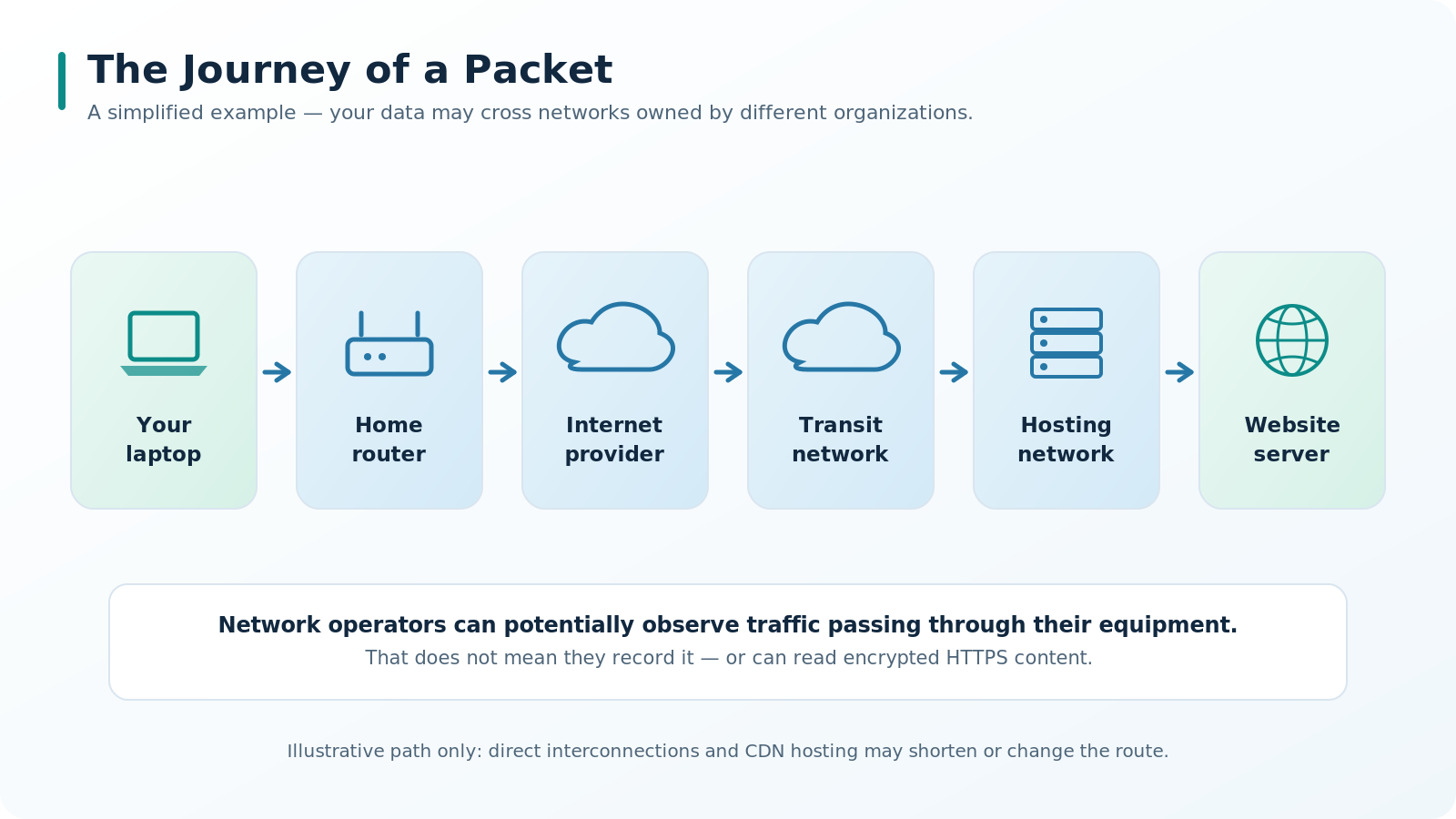
Your laptop → Home router → Internet provider → Transit network → Hosting network → Website server
There might be more networks involved, or fewer. A large website might also be served by a nearby content delivery network (CDN) server rather than a single distant data center.
At each stage, routers examine the necessary routing information and decide where to forward the packet next.
And they don't need to know which news article you're reading or what you've written in a message to do their job.
Here's the interesting part.
Your packets may travel through equipment owned by companies you've never even heard of.
Those companies are potential observers of your network traffic.
Not because they're deliberately watching you, but simply because that's how the internet works. Routers need enough information to send packets in the right direction. After all, a delivery driver can't deliver a parcel without knowing where it's going.
The operator of that networking equipment may have the technical ability to analyze traffic passing through it.
But that doesn't mean every router is recording your browsing history, let alone that someone is sitting there trying to decrypt your messages.
There's a big difference between having the ability to observe network traffic and actually collecting information about a particular user.
There's another important distinction, too.
If data travels over an encrypted connection, gaining access to the packets doesn't automatically mean you can read their contents.
If the data isn't encrypted, on the other hand, reading it may be surprisingly easy.
What Can Someone Actually See in Network Traffic?
Imagine we have the ability to observe packets traveling between your laptop and a website.
What would we see?
First of all, some technical information.
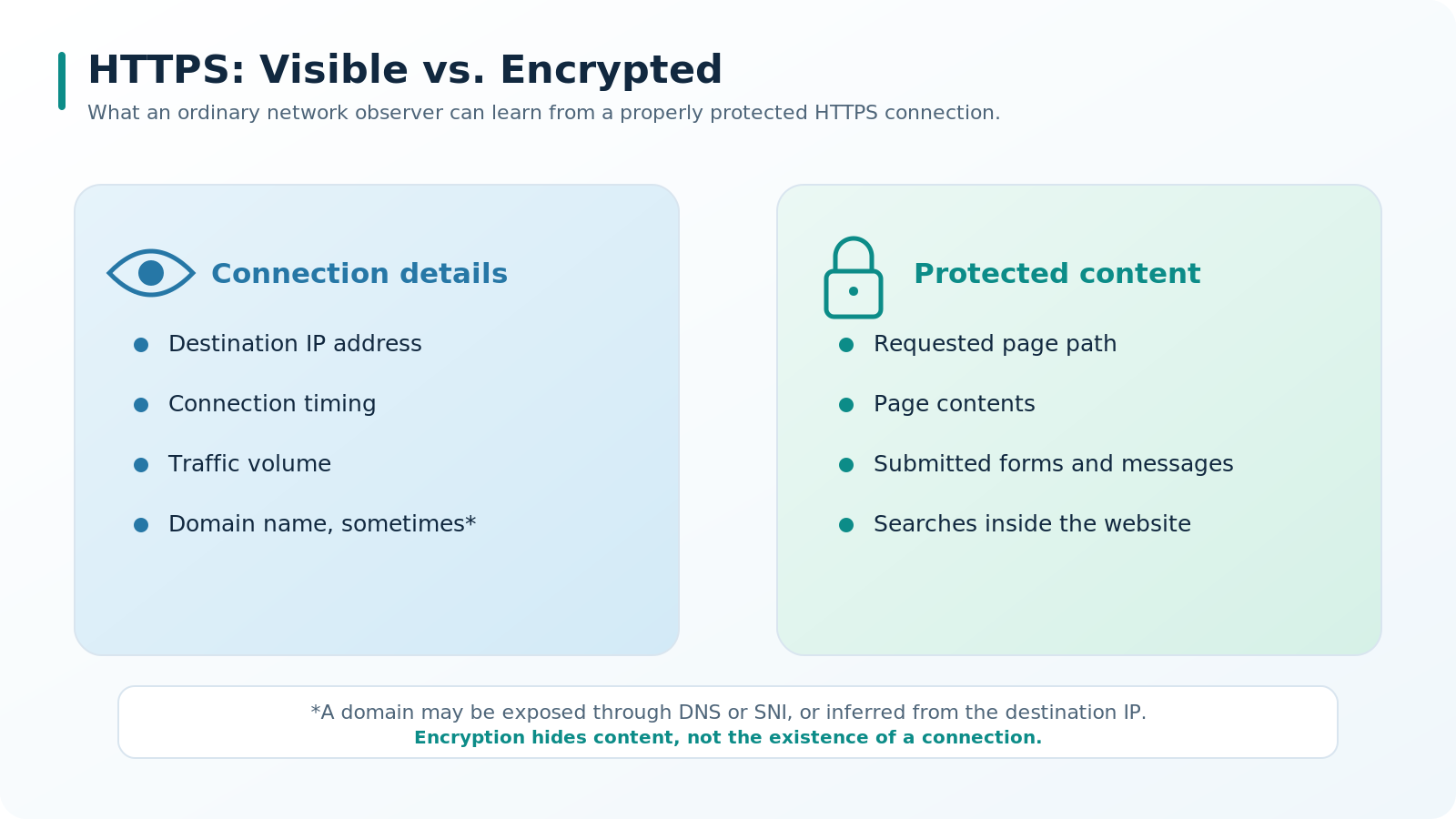
For example, the destination IP address, the timing of the connection, the amount of data transferred, and the transport protocol being used.
We might see a device connect to a particular server, send a few small packets, and then receive a much larger response.
But does that tell us the user was reading a particular article?
No.
It could mean almost anything. Maybe they watched a video. Maybe an application was downloading something in the background.
Traffic patterns can sometimes provide clues, especially when connections are observed over time. But a clue isn't proof. It's a basis for an educated guess, not a confirmed fact.
Information like this is often called metadata.
It describes things such as when data was exchanged, between which network addresses, and in what quantities, rather than the actual contents of the messages.
And that's one of the most important distinctions in online privacy.
Someone may know that a connection happened without knowing what was actually communicated.
What Can Your Internet Provider See?
Now let's return to the company that usually carries all your home internet traffic.
Your internet service provider, or ISP, gives you access to the internet. That means certain information about connections passing through its network is available to it.
It can see the IP addresses you're connecting to, when those connections happen, and how much data is transferred.
But can it identify the websites you visit?
Quite often, yes.
And this is where DNS comes into the picture.
Before opening example.com, your browser usually needs to find the IP address of a server that handles that domain.
To do that, it makes a DNS query.
If the query isn't encrypted, someone observing it along the way can read the domain name being requested.
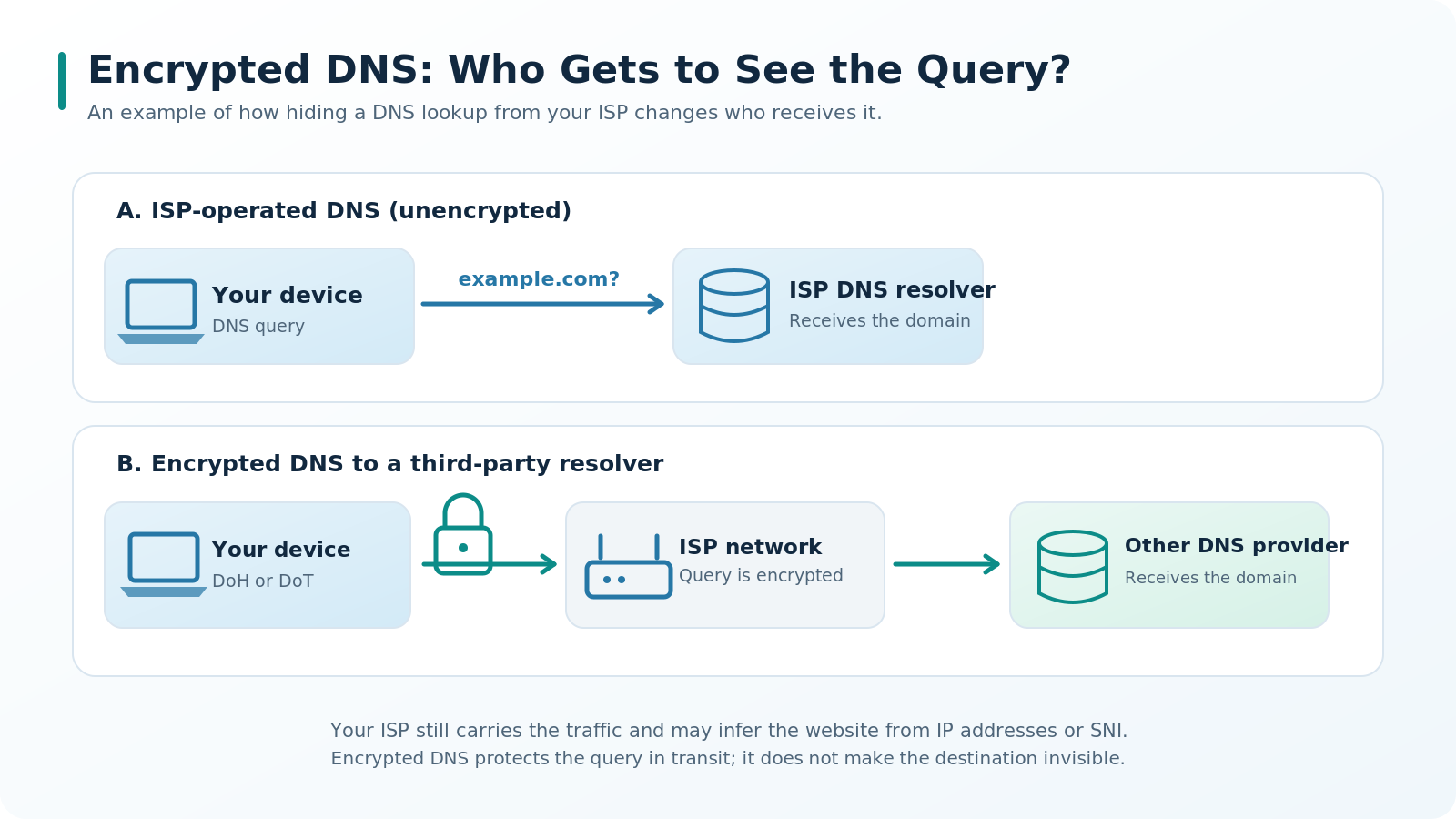
And if you're using your ISP's own DNS resolver, the ISP receives that query directly. After all, you're asking its server to find the IP address for a particular domain.
But suppose you decide to use a DNS service operated by another company.
Would that hide your DNS queries from your ISP?
Not by itself.
If your DNS queries are sent without encryption, your ISP can still see which domains you're looking up, even when the queries are addressed to a completely different DNS server.
That's why encrypted DNS exists, including technologies such as DNS over HTTPS (DoH) and DNS over TLS (DoT). We'll come back to those shortly.
But there's more to the story.
When establishing many HTTPS connections, your browser sends the requested server name in a field called SNI — Server Name Indication.
In traditional TLS connections, this information isn't encrypted and may be visible to observers along the network path.
So your internet provider can often work out which domain you're connecting to.
But here's a question.
Let's say your ISP knows you've visited a major news website.
Does it know which article you read? What comment you posted? What you typed into the website's own search box?
With a properly established HTTPS connection, under normal circumstances, no.
Why not?
HTTPS: What's Hidden and What's Still Visible?
Take a look at your browser's address bar.
Most modern websites use addresses beginning with https://.
HTTPS protects information in transit using an encryption protocol called TLS.
Normally, your browser establishes a secure connection to the website's server. The information carried inside that connection is encrypted before it travels across the network.
The routers along the way still forward the packets, but they don't have the keys needed to decrypt the protected content.
Imagine sending a private message through a website.
Your internet provider carries the packets containing that message, but it can't simply open them and read what you've written.
The same applies to web page contents, submitted forms, and other information protected by HTTPS.
Let's take an example:
https://example.com/articles/home-network
Depending on the technologies used, an observer along the route might discover that you're connecting to example.com.
But the path /articles/home-network, which identifies the particular page, is sent inside the encrypted HTTP request.
That means the observer normally can't determine which exact article you opened just by examining the contents of the encrypted traffic.
Problem solved, then?
Not quite.
Encryption protects the contents of a connection, but it doesn't make the connection itself invisible.
The destination IP address, connection timing, and amount of traffic can still be observed.
And HTTPS doesn't guarantee that a website is safe or trustworthy. A fraudulent website can have a perfectly valid HTTPS certificate too.
HTTPS protects data while it's being transmitted. It doesn't make you invisible, and it doesn't guarantee that the recipient can be trusted.
Can You Hide Even the Website's Name?
We've already seen that encrypted DNS can hide the contents of DNS queries from observers along the network path.
But there's something important to understand.
Hiding a DNS query from your ISP doesn't mean hiding it from everyone.
The DNS service handling the query still receives the domain name you're looking up.
You've changed who gets access to that information. You haven't made the information disappear.
Besides, after looking up a domain, your browser still needs to connect to the website.
Your ISP can see the destination IP address, and an unencrypted SNI field may reveal the domain name as well.
This is where another technology comes in: Encrypted Client Hello, or ECH.
ECH allows sensitive parts of the initial TLS handshake, including the actual server name, to be encrypted.
When ECH is supported and used, identifying the domain through SNI becomes much harder.
However, ECH doesn't automatically work with every website, and it doesn't hide the destination IP address.
There's another interesting detail: one IP address can serve many different domains, especially on large cloud platforms and CDNs.
So knowing the IP address doesn't necessarily tell you exactly which website someone visited.
But the opposite situation exists too.
If an IP address is used by just one website, identifying that website is often fairly straightforward. Even when multiple websites share an IP address, publicly available information about the network infrastructure can sometimes narrow down the possibilities considerably.
So encrypted DNS and ECH don't guarantee that your ISP won't be able to figure out which website you've opened.
Ultimately, what an observer can learn depends on several things: your browser settings, DNS configuration, network infrastructure, and the technologies used by the website itself.
That's why the claim that "your ISP can see every website you visit" shouldn't be treated as an absolute truth.
What Does the Website Itself Know?
So far, we've mainly been talking about the organizations carrying data between you and a server.
Now let's look at things from the website's point of view.
It's a completely different situation.
After all, you're connecting to its service.
If you open an article, the website receives a request for that particular page.
If you fill out a form and submit it, the website receives the information you entered.
If you log into your account, it can associate your activity with that account.
HTTPS doesn't prevent any of this. It has already done its job by protecting your information on the way there. You're now sharing that information with the website itself.
The web server also usually receives your public IP address, unless you're using an intermediary that changes the source address visible to the website.
The site may receive information about your browser, language, device settings, and other technical characteristics.
And then there are cookies.
Cookies are small pieces of data that a website can store in your browser and receive again on later visits.
They allow a website to remember that you're logged in, for example, or to save your preferences.
That's convenient. You don't have to select the same settings or log in again every time you visit.
But convenience has a downside.
If an attacker manages to obtain valid session cookies, they may, in some circumstances, be able to use someone else's authenticated session.
Of course, that doesn't mean cookies are inherently dangerous. A lot depends on how well the website protects user data and manages sessions.
There are more sophisticated ways to recognize browsers, too.
One example is browser fingerprinting, which attempts to recognize a browser by combining details about its technical characteristics.
Such methods don't necessarily identify a person with certainty, but they can sometimes provide a reasonably strong indication that two visits came from the same browser or device.
Now consider this.
You open a private browsing window, connect from a different IP address, and then sign in to your usual account.
As far as the website is concerned, you're still the user of that account.
Changing your IP address doesn't change the fact that you've identified yourself to the website.
Encryption protects information from outsiders along the way, not from the people you choose to share it with.
Sometimes the Website Isn't the Only One Receiving Information
Here's another detail that people don't often think about.
A modern web page doesn't necessarily get all its content from a single server.
It may include images, embedded video players, advertisements, analytics systems, and other components supplied by third-party companies.
When your browser loads those elements, it may establish additional connections you don't even know about.
Imagine visiting an online store that uses an analytics script provided by another company.
Depending on how the website and script are configured, that company may receive information about your visit and certain actions you take on the page.
That doesn't mean every third-party service automatically knows everything you're doing.
But it does mean that information about your activity can sometimes reach organizations you never intended to interact with directly.
And here's an interesting paradox.
Someone might worry that their ISP will find out which online store they're visiting, while willingly logging into that store's account and saving their delivery address, purchase history, and payment details.
In that situation, the store knows far more about that customer than the internet provider does.
What If You're Using Someone Else's Wi-Fi?
Suppose you take your laptop to a café and connect to its Wi-Fi network.
Your traffic now passes through equipment you don't own or control.
Can the café owner read your messages?
If those messages are transmitted over a properly established HTTPS connection, simply controlling the Wi-Fi access point doesn't give the owner that ability.
The network administrator may see certain information about connected devices and their network traffic, but the protected contents of HTTPS connections remain encrypted.
That doesn't mean every public Wi-Fi network is safe, though.
Fake access points, attempts to redirect users to fraudulent websites, and other attacks are real concerns.
And if an application sends sensitive information without proper encryption, that information may indeed be intercepted by someone with the necessary access to the traffic.
There's also a special case worth mentioning: company-managed computers.
An organization controlling a device may install additional monitoring and security tools, including systems that inspect HTTPS traffic using trusted certificates installed on that device.
But that's a different situation from connecting your personal laptop to a café's Wi-Fi.
In a corporate environment, there's an IT administrator, an organization responsible for the equipment, and policies determining what users can and cannot do.
The main point remains the same:
Using someone else's network doesn't automatically expose your encrypted data. But it doesn't eliminate every security risk either.
What About Incognito Mode?
Almost every modern browser offers some form of private browsing mode.
The name sounds promising. You might think that once you've opened an incognito window, nobody can find out which websites you're visiting.
But that's not what the feature is designed to do.
Incognito mode primarily limits the browsing history and certain other information saved locally by your browser during a private session.
For example, once all private windows are closed, the browser typically deletes cookies associated with that session and doesn't add the visited pages to your regular browsing history.
That's useful when you're sharing a computer or want to keep one browsing session separate from another.
But incognito mode doesn't change the route your network packets take.
Your ISP still provides the connection. The websites you visit still receive your requests. The network administrator still has the same technical ability to observe traffic.
And if you log into an account, private browsing mode won't stop the website from recognizing that account.
Incognito mode is useful. It just doesn't protect you from quite what many people imagine.
So Who Can See What?
After all these explanations, let's return to our original question.
Suppose you open a regular website over HTTPS.
Here's a simplified picture of what different parties may be able to learn:
| Party | Information potentially available |
|---|---|
| Internet service provider | Destination IP addresses, connection times, traffic volumes, and sometimes domain names |
| Intermediate network operators | Information visible in packet headers and observable traffic characteristics |
| DNS resolver | Requested domain names and certain details about the source of the queries |
| Website you visit | Requested pages, submitted information, connection details, browser characteristics, and account information |
| Third-party services on the page | Information shared with them by your browser or the website |
This isn't a fixed set of permissions. It's a general picture of what things can look like.
In reality, a lot depends on the technologies being used, how they're configured, and which systems handle a particular connection.
But the table illustrates the central point.
There isn't one universal observer who automatically knows absolutely everything.
Different parties have access to different pieces of information.
And even when someone technically has the ability to collect certain information, that doesn't mean they're actually collecting it or taking any interest in a particular person.
If You Have Nothing to Hide, Why Care About Privacy?
At this point, you might ask a perfectly reasonable question.
I don't do anything illegal. I read the news, watch videos, and talk to friends. Why should I care if my internet provider knows something about my connections?
Maybe you don't care.
But there's another way to look at it.
Imagine researching a medical issue, looking into your personal finances, searching for a new job, or reading about something you'd rather not discuss with strangers.
There's nothing illegal or shameful about any of those activities.
And yet you might feel uncomfortable knowing that someone could potentially build a picture of your interests, habits, or personal circumstances.
That doesn't mean anybody is deliberately watching you.
There's a significant difference between "nobody is watching right now" and "nobody has the technical ability to obtain that information."
Privacy isn't just about hiding something forbidden.
It's also about having some control over which parts of your life you choose to share with others.
We close the curtains in the evening not because we're planning to do something illegal.
We simply don't want every passerby looking through our windows.
The internet isn't so different.
Of course, protecting everyday privacy and trying to avoid identification during a targeted investigation are two very different things.
In the latter case, information may come from many sources: online services, user accounts, devices, and other evidence. Investigators may have access to methods that go well beyond observing network traffic.
That's why no single connection-protection technology can guarantee complete anonymity.
But the absence of absolute protection doesn't make everyday privacy meaningless.
Can You Change Who Sees Your Traffic?
We now know that different participants in an internet connection have access to different kinds of information.
And some technologies allow us to change that picture.
HTTPS hides the contents of transmitted data from ordinary observers along the network path.
Encrypted DNS limits who can read DNS queries while they're in transit.
ECH can hide the actual server name during the initial TLS handshake.
But none of these technologies eliminates every possibility of observing a connection.
What if we changed the way we connect to the internet itself?
What if, instead of seeing separate connections to many different websites, your ISP saw one encrypted connection to an intermediate server?
That's the basic idea behind many VPN services.
But it introduces another interesting question.
If your internet provider can no longer see certain details about your connections to other websites, who gets access to that information instead?
The VPN provider?
And how much should you trust it?
That's a question for another article.
For now, let's return to the two things we've learned.
First, being able to observe network traffic doesn't mean being able to read its contents.
An intermediate network operator may see that a connection exists, where packets are going, and how much data is being transferred. But that doesn't mean the operator can read your messages, see the contents of a web page, or identify every action you take.
Second, when we hide information from one party, we sometimes reveal it to another.
When we choose a third-party DNS service or use a VPN, we aren't just changing the technical path our data takes. We may also be changing which organizations we need to trust.
That doesn't mean every privacy technology simply moves information from one company's hands into another's. Some technologies genuinely reduce the amount of information available to outsiders.
So when it comes to online privacy, what matters isn't just who can observe your connection. It's also what they can actually learn from it.
And when choosing tools to protect your privacy, there's one more question worth asking:
Are we actually reducing how much of our information others can access, or are we simply changing who we have to trust?
Was this article helpful?
Found a factual error?
Technical accuracy matters. Tell us what appears incorrect, and we will review it.