NAT: How Dozens of Devices Share One IP Address — and Why That Sometimes Causes Problems
How does NAT let dozens of devices share one public IPv4 address? Discover how address translation works, why IPv6 matters, and what CGNAT changes.
Published
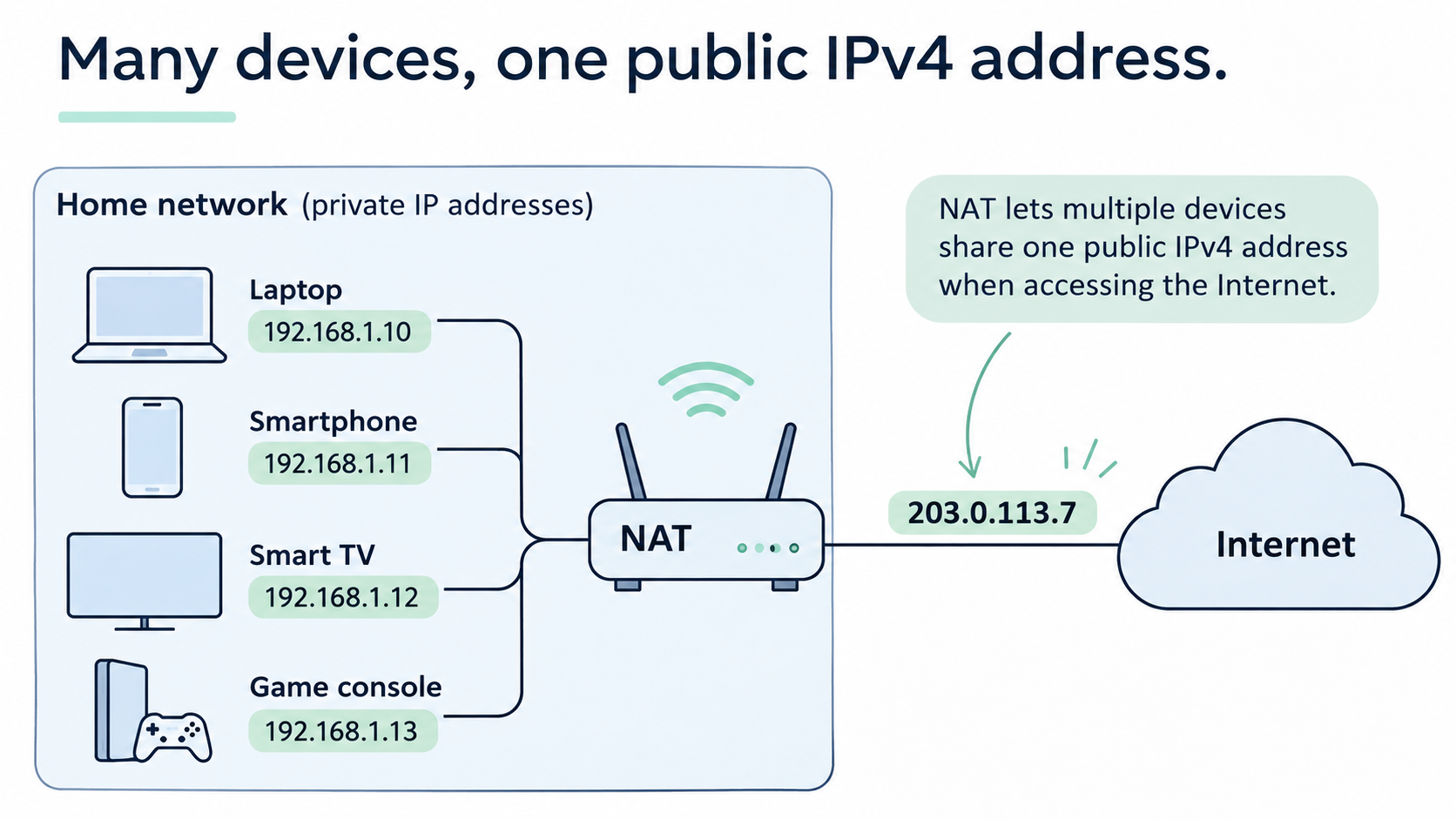 Picture a typical home. A computer, two smartphones, a TV, a gaming console, and a few other devices.
They're all connected to the same router. They're all using the internet at the same time. Someone's watching YouTube on the computer, Facebook is open on a phone, the TV is streaming a movie, and the gaming console is downloading yet another update that seems to take up half its storage.
And everything works just fine.
But there's an interesting question hiding in all this.
Every device on your home network has its own IP address. Something like 192.168.1.10, 192.168.1.11, or 192.168.1.12.
Yet if you check your public IPv4 address from any of those devices, you'll usually see exactly the same address.
So somehow, a dozen devices are communicating with the internet while sharing a single IP address.
How does a remote server know where to send its response? Why doesn't the YouTube video meant for your computer end up on the TV instead? And how does your router keep track of everything?
In most home networks, the answer involves a mechanism called NAT — Network Address Translation.
In our previous article, we looked at why computers need IP addresses and how packets find their way across the internet.
But there's one detail we haven't explored yet.
Not every IP address is meant to be reachable from the public internet.
Take a typical home router. It assigns addresses to devices on the local network, for example:
- Computer — 192.168.1.10
- Smartphone — 192.168.1.11
- TV — 192.168.1.12 These are private IP addresses. They're designed for use inside local networks.
What's interesting is that your neighbor might have devices with exactly the same addresses. So might I. And so might millions of other people around the world.
No conflicts whatsoever.
Why? Because these addresses are used within separate networks. Routers on the public internet don't route packets to private IPv4 addresses the way they route packets to public ones.
IPv4 has three main private address ranges:
- 10.0.0.0/8
- 172.16.0.0/12
- 192.168.0.0/16 You don't need to memorize them. For now, the important thing is that a device's private IP address and its public IP address are not the same thing.
But that raises an obvious question.
Why not simply give every computer, phone, and television its own public IP address? Why bother inventing additional mechanisms?
To understand that, we need to take a short trip back in time. Four Billion Addresses. How Could That Not Be Enough? When the protocols that would become the foundation of the internet were being developed in the 1970s, nobody really knew what this network would eventually turn into.
Computers were enormous, expensive machines, mostly found in universities, research institutions, and large organizations.
The idea that an ordinary schoolkid would one day carry a device in their pocket more powerful than many computers of that era would have sounded like science fiction.
The developers chose 32-bit addressing, which became the basis of IPv4.
That allowed for 4,294,967,296 possible addresses.
Almost 4.3 billion.
Just think about that number.
At the time, it was comparable to the population of the entire planet. Surely that would be enough?
Of course, not all those addresses could be assigned freely to devices. Parts of the address space are reserved for special purposes.
Still, the number seemed enormous.
Decades later, Vint Cerf, one of the pioneers of the internet, explained that 32-bit addressing had seemed sufficient for an experiment.
The trouble, as he later joked, was that the experiment never ended.
And indeed, the experiment turned out to be rather more successful than anyone might have expected.
The internet kept growing. Computers moved into people's homes. Mobile phones followed. And eventually, engineers started connecting just about anything they could think of.
We've reached the point where even toothbrushes receive firmware updates over the internet.
And no, that's not a joke. Some electric toothbrushes really do connect to a smartphone over Bluetooth and receive software updates through an app.
Imagine explaining to an engineer in the 1970s that one day we'd need the internet to update a toothbrush.

But back to IP addresses.
By the 1990s, it had become clear that IPv4 addresses were not an unlimited resource. If the internet continued growing, the available supply would eventually run short.
Which brings us to another perfectly reasonable question. Why Not Just Make More Addresses? All right. Four billion addresses weren't enough.
So what's stopping us from creating a new protocol with 40 billion addresses? Or 400 billion? Or perhaps four trillion?
Internet engineers were thinking along similar lines.
The result was IPv6, a new version of the Internet Protocol whose first specification was published in 1995.
And this time, they decided not to think small.
Instead of IPv4's 32-bit addresses, IPv6 uses 128-bit addresses.
That doesn't mean four times as many addresses.
Or even four billion times as many.
The total number of possible IPv6 addresses is:
340,282,366,920,938,463,463,374,607,431,768,211,456
That's roughly 340 undecillion.
A number so enormous that I'm not even sure what to compare it to. Every grain of sand on Earth? I'm afraid even that wouldn't come close.
Of course, this doesn't mean every one of those addresses is available to assign to a device. IPv6 also has its own address structure, allocation rules, and special-purpose ranges.
But the kind of address shortage that became such a problem for IPv4 is effectively eliminated.
Problem solved, then.
Just upgrade the internet and forget about running out of addresses.
Well, there's one small catch.
IPv6 isn't simply IPv4 with longer addresses. It's a different protocol.
The packet format changed. Address representation changed. Several aspects of how the network operates changed too.
Equipment that only understands IPv4 can't simply take an IPv6 packet and process it as if it were an ordinary IPv4 packet.
Operating systems, routers, network equipment, internet providers, and servers all need to support the new protocol.
And most importantly, IPv4 and IPv6 can't communicate directly as though they were the same protocol. Additional mechanisms are needed when traffic must cross between the two.
All of this had to be introduced into an internet that was already up and running.
Imagine trying to replace the world's roads with a completely new transportation system, one in which vehicles follow different rules.
The old cars aren't going anywhere. You can't close the roads. And traffic has to keep moving around the clock.
That's roughly the kind of challenge engineers faced.
You couldn't just shut down the internet for the weekend, install an update, and switch it back on.
The transition to IPv6 has stretched over decades.
Today, both versions continue to operate side by side. Many devices and networks support IPv4 and IPv6 simultaneously, using whichever is appropriate for the destination they're trying to reach.
By the mid-1990s, the internet was no longer an obscure curiosity. Millions of computers were already connected, and they all needed to keep working.
Simply shutting everything down for an unknown amount of time to replace one protocol with another wasn't an option.
A solution was needed that could be deployed right away, without forcing the entire internet to replace its hardware and software.
And there was one.
In May 1994, RFC 1631 was published, describing a mechanism called Network Address Translation, or NAT.
Unlike a worldwide transition to a new protocol, NAT could help conserve public IPv4 addresses while keeping the existing IPv4 infrastructure in place.
The basic idea was simple: allow multiple devices to share a single external IP address.
It didn't eliminate IPv4's limited address space, but it helped make much more efficient use of the addresses available.
Incidentally, on February 3, 2011, IANA allocated its last major blocks of free IPv4 addresses to the regional internet registries.
The central pool was exhausted, although addresses were still available through regional registries and other organizations.
But the internet kept working.
In large part because we'd learned how to share public IPv4 addresses.
Now let's see how that actually works. What NAT Actually Does Suppose a computer with the address 192.168.1.10 wants to contact a server on the internet.
It creates a request and sends a packet to the router.
The problem is that its private IP address can't be used as an ordinary return address across the public internet.
So the router replaces the packet's source IP address with its own external address.
For example:
Before: 192.168.1.10
After: 203.0.113.7
The remote server receives the packet and sees that the request came from 203.0.113.7.
It has no idea that somewhere behind that address there's a computer using 192.168.1.10.
And it doesn't need to know.
The server sends its response back to 203.0.113.7. The router receives it, determines which internal device should get it, changes the destination address, and forwards the packet to the computer.
That's the basic idea.
But we've only explained half the mechanism.
After all, there's more than one computer at home. There's a whole collection of devices, and they might all be communicating with the same server at once.
So how does the router tell their responses apart? The Secret Isn't Just IP Addresses. It's Ports, Too. To understand that, we need to introduce another concept: network ports.
If an IP address helps identify a device, a port helps distinguish network communications associated with that device.
We're not talking about a physical socket on the back of a computer. A network port is simply a number.
For example, web servers commonly accept HTTPS connections on port 443.
But an IP address is only part of the picture.
When a computer connects to a server, it also uses a source port of its own.
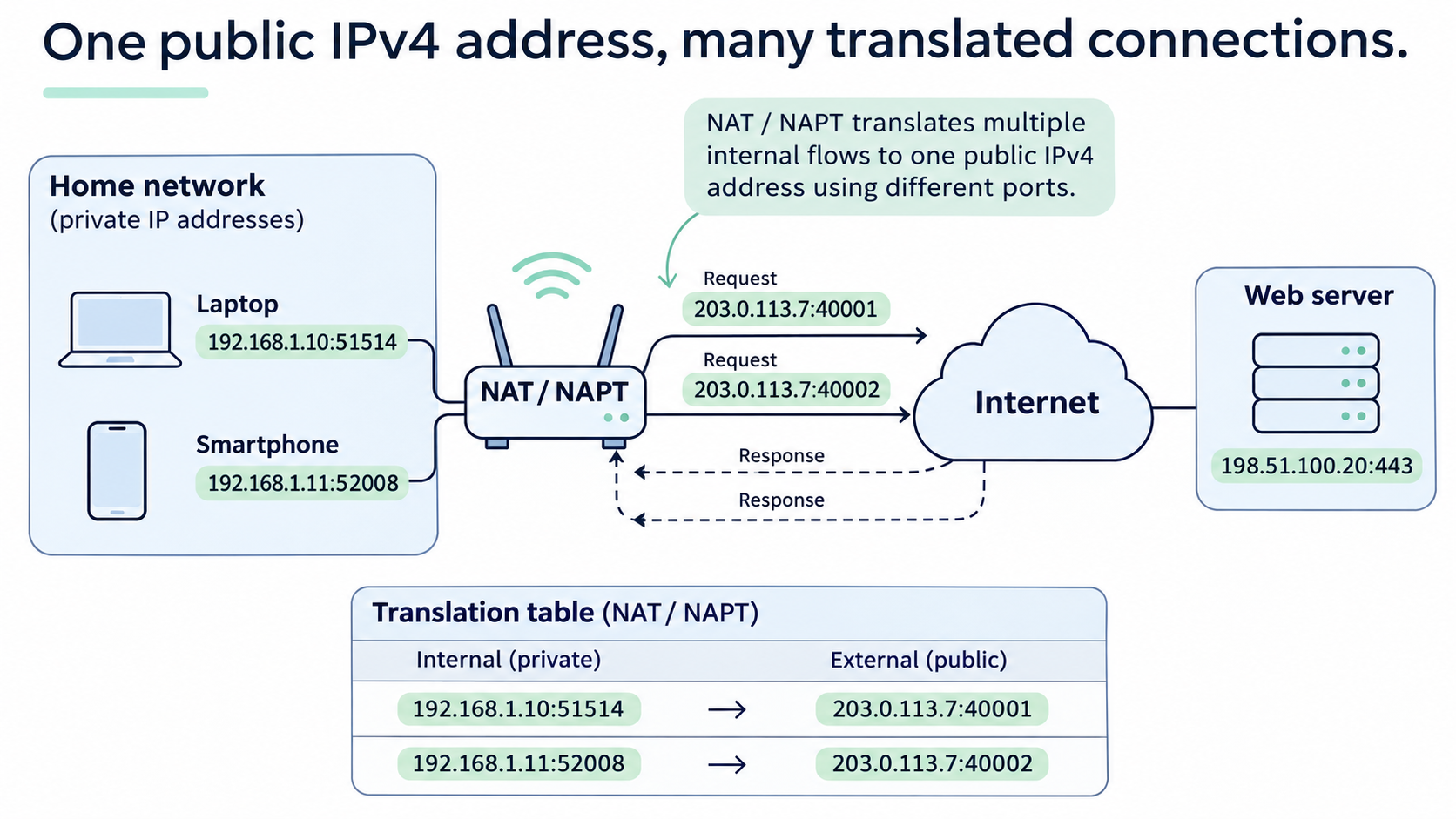
For example, your computer might send a request from 192.168.1.10 using port 51514, while your smartphone sends one from 192.168.1.11 using port 52008.
The router replaces their private IP addresses with its public address and, when necessary, changes the port numbers too.
The result might look like this: Inside your network On the internet 192.168.1.10:51514 203.0.113.7:40001 192.168.1.11:52008 203.0.113.7:40002
The router keeps track of these mappings in a special table.
When the server sends a response, the router uses the appropriate mapping to work out which internal device should receive it.
And that's the trick.
One public IP address, many separate connections, and each device gets the data intended for it.
This mechanism is called NAPT — Network Address and Port Translation. It translates both addresses and ports, and it's what most home routers use when we casually talk about NAT.
The IP addresses and ports in these examples are illustrative, not actual measurements.
What Happens to All Those Mappings? It would be rather inconvenient if your router kept a permanent record of every connection ever made by every device in your home.
Fortunately, NAT mappings don't last forever.
With TCP, a router can track the state of a connection and remove its mapping after the connection closes or a timeout expires.
UDP works a little differently. It doesn't establish and close connections in the same way TCP does, so NAT devices generally rely on traffic activity and timeouts to decide how long to keep a mapping.
As a result, the table is constantly changing.
You open a webpage — new entries appear. You close an application — some entries eventually disappear. Your TV starts streaming a movie — more network exchanges begin.
The router handles all of this automatically.
Most of us have no idea how much work is going on inside that little box we usually only notice when the internet stops working. Why Can You Reach the Internet, but the Internet Can't Always Reach You? Now things get interesting.
When a computer inside your network contacts an external server, the router creates a NAT mapping. That gives the server's response a way back to the right device.
But what happens in the opposite direction?
Imagine you've set up a small server at home, perhaps to store photographs or access your personal files.
It's running on a computer with the address 192.168.1.50.
You leave home and decide to connect to it over the internet.
You send a request to your home router's public IP address.
The router receives the packet and faces a problem.
Where should it send it?
Your computer? Your smartphone? Your TV? Your home server?
The public IP address alone doesn't provide the answer.
If there's no matching NAT entry or predefined rule, a typical home router won't simply pick a device and forward the packet to it.
That's why ordinary outgoing connections work so well, while new incoming connections are often unavailable by default.
It's also one reason NAT can complicate things like home servers, certain online games, direct connections between users, and remote access.
Fortunately, there's a fairly straightforward way to handle this on a typical home network. Port Forwarding: Telling the Router Where to Send Traffic For incoming connections, there's a mechanism called port forwarding.
The idea is simple.
We tell the router in advance:
"If a request arrives from the internet on this particular port, send it to this device on my local network."
For example:
203.0.113.7:8443 → 192.168.1.50:443
Now requests arriving on external port 8443 will be forwarded to port 443 on the home server.
The router no longer has to guess where the packet belongs. We've given it an explicit rule.
Of course, creating that rule doesn't guarantee the connection will work. The application must actually be listening for connections, and the firewall must allow the traffic.
And there's another complication.
For an incoming request to reach your router, it first has to make it through your internet provider's network.
That doesn't always happen. When Your Internet Provider Uses NAT Too We tend to assume that our home router has one external IP address that it uses to communicate with the internet.
But what if that address isn't public either?
Imagine this situation.
Your router shows a WAN address of 100.72.15.20.
But when you visit a website that displays your public IP address, it reports something completely different — say, 203.0.113.7.
And your neighbor sees that same public address.
No, your internet provider hasn't mixed up your connections.
Most likely, it's using CGNAT — Carrier-Grade NAT.
This is NAT operating not in your home, but inside your internet provider's network.
In this kind of setup, packets go through two layers of address translation.
First, your home router translates your computer's private address into the address assigned to the router's external interface.
Then the provider's equipment translates that address into a public one.
Only then does the packet reach the wider internet.
Why would an internet provider do this?
For the same reason we've already discussed: public IPv4 addresses are in short supply.
If a home router can let several devices share one external address, an internet provider can use a similar approach to let multiple customers share one public IPv4 address.
Your computer, phone, and TV may therefore be using a public IP address that's also shared by several other households.
For ordinary web browsing, this usually makes little difference. Online games and other applications often work perfectly well too.
But if you want to accept incoming connections to a home server, things become more complicated.
Even if you configure port forwarding on your own router, there's still another NAT device in the provider's network.
And you don't control its settings.
So ordinary port forwarding on your home router won't solve the problem.
If you need a direct incoming IPv4 connection, you'll have to contact your provider and find out whether it can offer a public IPv4 address or the necessary configuration.
Your router might be perfectly willing to accept the connection.
The packet simply never reaches it.
How to Check Whether You're Behind CGNAT You don't need any special software for an initial check.
First, open your home router's settings and find its WAN IPv4 address — the address assigned on the provider-facing side.
Next, visit a website that shows your public IPv4 address.
Compare the two.
If your router's WAN address falls within 100.64.0.0–100.127.255.255, that's a strong indication that you're using address space reserved for shared IPv4 networks, commonly associated with CGNAT.
If the WAN address belongs to a private range, such as 192.168.x.x or 10.x.x.x, there's another network device upstream of your router.
That could be your provider's equipment, or it could simply be another router in your home.
Either way, it's worth checking whether there's an additional layer of NAT.
Make sure you're comparing IPv4 addresses, not IPv6 addresses. It's also best to temporarily disconnect any VPN or proxy service you're using, since that could affect the result you're trying to check.
If both IPv4 addresses match and the address is genuinely public, you probably have a direct public IPv4 connection without an additional layer of NAT at your provider.
That doesn't automatically mean incoming ports are open. Your provider or firewall may still restrict connections.
But at least you know where to start looking.
And if you discover that you're behind CGNAT, but your internet connection and all the applications you use are working perfectly well, there's nothing you need to fix.
CGNAT isn't a malfunction. It's simply one way your internet provider delivers connectivity. Does NAT Make the Internet Safer? Not Exactly. There's a common belief that because NAT hides private IP addresses from the public internet, it protects your home network.
There's some practical truth behind that idea.
In a typical home setup, someone on the internet can't simply connect to an arbitrary private IP address inside your network. New incoming connections generally won't reach those devices without additional rules.
But that doesn't make NAT a complete security solution.
It doesn't encrypt your traffic.
It doesn't check whether a website is fraudulent.
It doesn't stop malware on your computer from contacting a remote server.
And it certainly doesn't make you anonymous online.
Websites can still see the public IP address your traffic comes from, and they may use cookies, accounts, and other methods to recognize users.
It's better to think of NAT as an address and port translation mechanism that, in a typical home setup, also makes unsolicited incoming connections harder to establish.
But it's no substitute for a firewall or other security measures.
This is also worth remembering when thinking about IPv6.
As we've already seen, IPv6 allows devices to have their own globally unique addresses without relying on NAT to conserve address space.
But not using NAT doesn't mean giving up security.
Even if a home computer has a global IPv6 address, a firewall can still block unwanted incoming connections.
Being able to address a device and being allowed to connect to it are two very different things.
And that's another reason not to confuse NAT with a general-purpose security system. So, What's the Takeaway? Let's return to our home.
The computer, smartphones, TV, and gaming console are all using the internet through the same public IPv4 address.
The router translates their internal addresses and ports, keeps track of the mappings, and uses those records to deliver incoming responses to the right devices.
It all happens automatically.
So seamlessly, in fact, that most people have probably never even heard of NAT.
You could reasonably call NAT a workaround — a clever patch for a limitation built into IPv4.
But it turned out to be an extraordinarily useful one. It helped the internet keep growing for decades despite the limited supply of IPv4 addresses.
Meanwhile, the transition to IPv6, which once looked like the obvious long-term solution, is still underway.
Was this article helpful?
Found a factual error?
Technical accuracy matters. Tell us what appears incorrect, and we will review it.