How Computer Networks Work — and Why the Internet Works at All
How does your home network connect to the internet? Explore IP addresses, DNS, routing and NAT through everyday examples and a simple experiment.
Published
It's an ordinary evening. You're watching YouTube on your laptop, your wife is scrolling through Facebook, and your child is watching cartoons in the next room.
One internet connection. One home router. And a constant stream of videos, photos, messages, and all sorts of other data passing through that little box.
Yet nothing gets mixed up. YouTube plays on your laptop, Facebook works on your wife's phone, and the cartoons keep running on the TV.
How does the router know where everything belongs? And how does information reach us from the other side of the world in the first place?
Let's find out. We won't have to look far — there's probably a computer network running in your home right now.
There's a Computer Network in Your Home
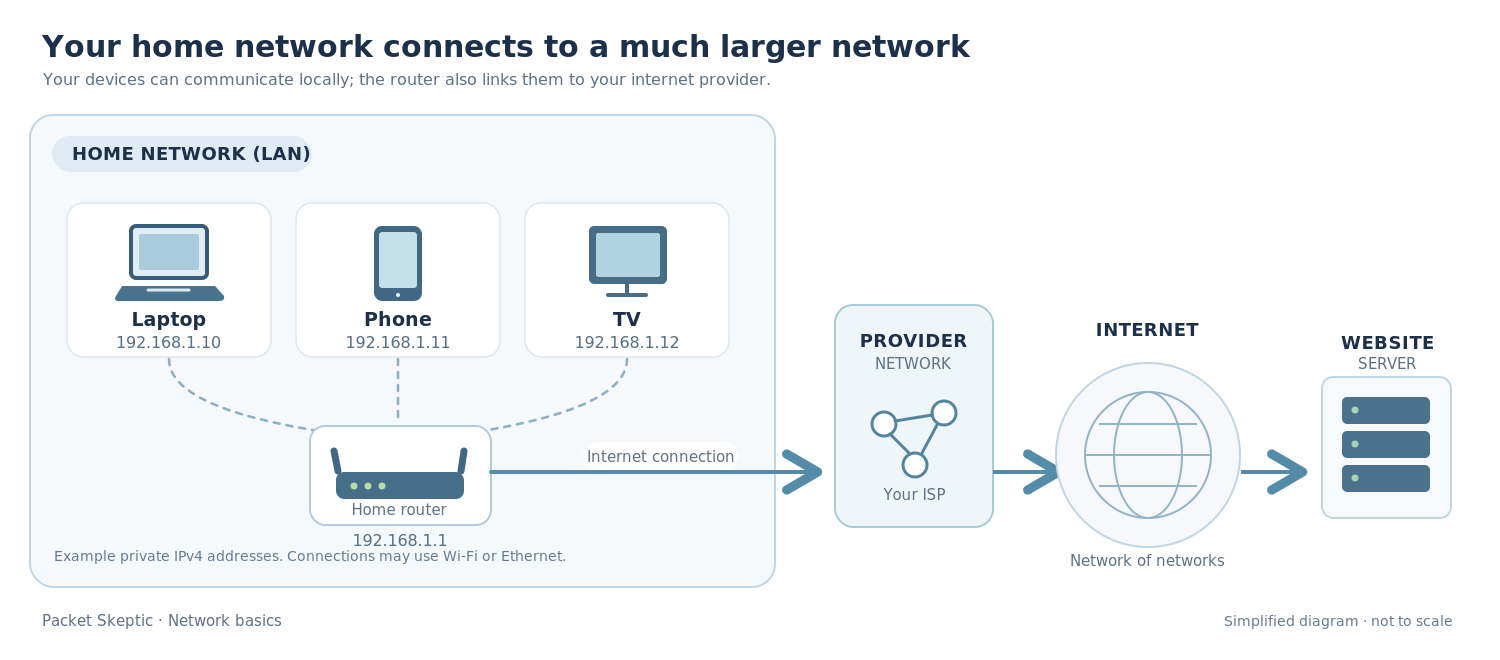
Phones, laptops, TVs, game consoles — almost everything these days can connect to a network. Usually through a home router, either over Wi-Fi or with a cable.
Together, these devices form a computer network.
Put simply, a network is a group of connected devices that can exchange data using a shared set of rules.
For example, you might print a document from your laptop using a network printer. Or send a video from your phone to your TV, provided both devices support it.
And you don't necessarily need the internet for any of this. Devices can still communicate within your home network even if your internet provider's connection goes down.
Of course, connecting that network to the internet opens up far more possibilities.
The internet is an enormous collection of computer networks connected to one another around the world.
Your home network joins this vast system through your internet provider. That's how the laptop sitting on your desk can communicate with a server thousands of miles away.
But before you can send information anywhere, you need to know where it's going.
How Do Devices Find Each Other?
Think about ordinary mail. If you want to send someone a letter, you need their address. Otherwise, there's nowhere to deliver it.
Computers need addresses too. One of the most important is the IP address.
Let's say your laptop has the address 192.168.1.10 on your home network, while your smartphone has 192.168.1.11.
These are private IP addresses. They help devices identify and communicate with one another inside the local network.
Who assigns them? Usually your home router. Most of us have no idea what addresses our devices have been given, and we get along just fine without knowing.
Things get trickier once we go online.
To visit this magazine, for example, you just type packetskeptic.com. There's no need to memorize a string of numbers.
But your computer still needs an address to establish a network connection.
That's where DNS comes in.
DNS: Why We Don't Have to Memorize Website IP Addresses
You've probably called a friend plenty of times without having the slightest idea what their phone number is.
Why would you need to remember it? You select their name from your contacts, and your phone takes care of the number.
DNS — the Domain Name System — does something similar for the internet.
You enter a website's name, and DNS helps your device find its IP address.
But don't imagine one enormous computer holding a list of every website on Earth. DNS doesn't work that way. It's a distributed system made up of many servers working together.
Usually, your device asks a DNS resolver to find the answer.
If someone using that resolver has looked up the website recently, the answer may still be saved in its cache. If it's still valid, the resolver can return it immediately.
Otherwise, it consults other DNS servers to find the information. It can then keep the result for a while, so the same lookup doesn't have to happen again every time.
There's another detail worth knowing: a large website may have several IP addresses rather than just one. That's perfectly normal. Popular services often operate servers in different cities and countries.
So, we've found the address.
Now comes the next challenge: actually getting the data there.
How Data Travels Across the Internet
Imagine the server you want to reach is in the United States, while you're sitting at home somewhere in Europe.
There's an ocean between you, thousands of miles of distance, and networks operated by all sorts of different companies.
Nobody has run a dedicated cable from your laptop to every website you might want to visit.
And nobody needs to.
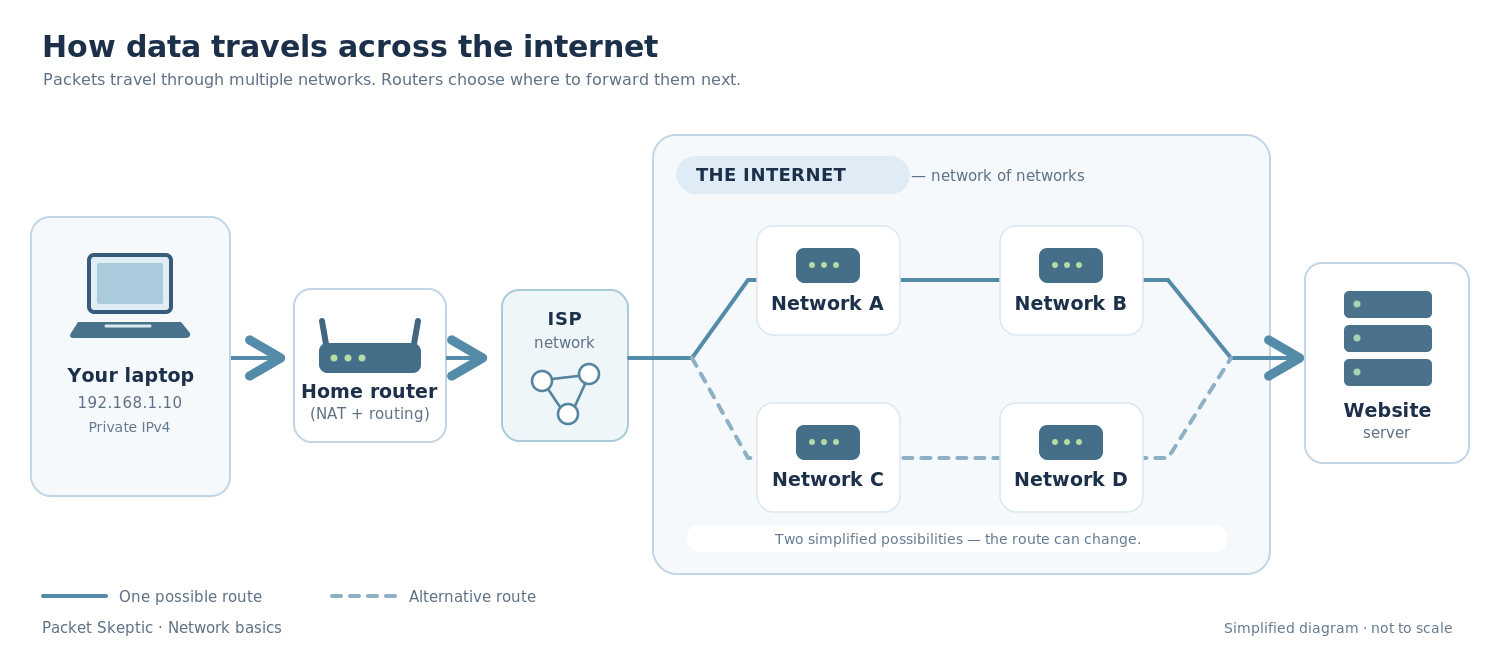
Your router connects to your local internet provider's network. That provider connects to other networks, which connect to still more networks.
That's how the internet comes together.
When you open a website, data is usually transmitted in smaller pieces called packets.
An IP packet contains some of the information being transferred, along with details needed to deliver it — including the destination address.
This is where routers come into play.
As packets travel across the internet, routers decide where to send them next. They use routing tables to make those decisions.
A router doesn't have to know every step of the journey to the destination server. It just needs to determine the appropriate next hop.
The next router makes its own decision, and so on, until the packets reach the destination network.
Packets belonging to the same exchange don't always follow exactly the same path. Routes can change, and the server's response may even take a different route on its way back to you.
Once your request reaches the server, the server processes it and sends a response. Your browser receives the data and gradually puts the page together.
And a modern website might load its content from several servers at once: images from one, video from another, and other elements from somewhere else entirely.
All of this usually happens in a matter of seconds.
Now let's head back home.
We've seen how data travels between networks, but one thing is still unexplained.
You have YouTube running on your laptop, Facebook on another device, and cartoons playing on the TV.
How does your router know which data belongs to which device?
The answer starts with a small experiment.
A Little Experiment with IP Addresses
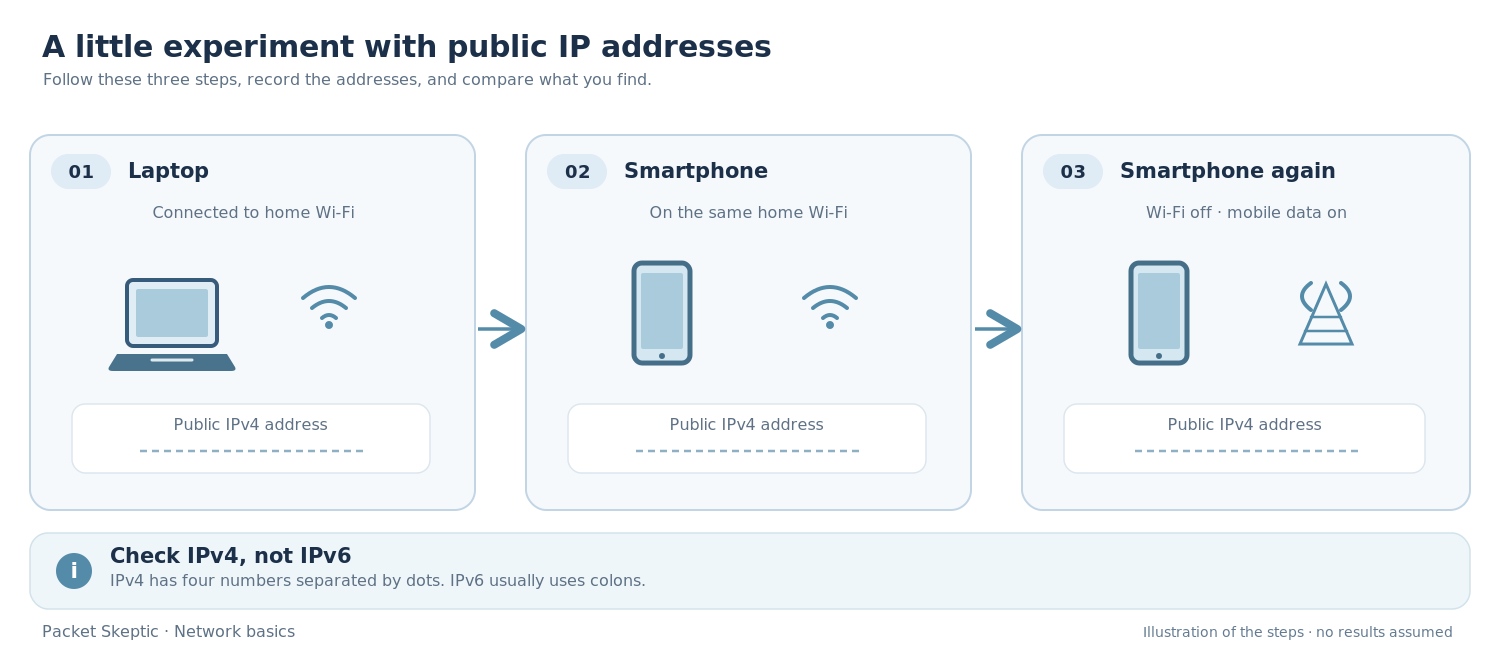
Grab your laptop and smartphone. You won't need to install anything or change any settings.
First, check your laptop.
Connect to your home internet, open a browser, and search for what is my IP.
Choose a website that shows your public IPv4 address. It will look like four numbers separated by dots.
If you see a long address full of colons, that's IPv6. Look for a website that specifically reports IPv4.
Write down the address.
Now pick up your smartphone.
Make sure it's connected to the same home Wi-Fi network. Open the same website and check the phone's public IPv4 address.
Compare the two.
On a typical home network, you'll probably notice something curious: the addresses are identical.
Even though you're using two completely different devices.
Now turn off Wi-Fi on your phone and repeat the check using mobile data.
Has the address changed? That's what you'd normally expect. Your phone is now accessing the internet through your mobile carrier rather than your home connection.
So two entirely different devices can use the very same public IP address.
You may never have noticed it before.
A quick note: this experiment specifically checks IPv4. A VPN or certain network configurations can affect the results.
How Several Devices Share One IP Address
Inside your home network, your laptop and smartphone have different addresses. We already know why: the network needs a way to distinguish between devices.
But on a typical home IPv4 connection, those devices share one public IP address when they access the internet.
How does the router make that work?
The answer is NAT — Network Address Translation.
When your laptop sends data out to the internet, the router replaces its private source IP address with the public one.
But simply changing the address isn't enough.
After all, you might have ten devices connected at home, each with several websites and apps running at the same time. If all the replies arrive at one public address, how does the router know where to send them?
This is where port numbers come in.
They're numbers that help distinguish different exchanges of network traffic. And no, they have nothing to do with the physical sockets on your computer.
The router uses port numbers alongside IP addresses to keep track of which traffic belongs to which device.
For each outgoing exchange, it records a mapping between the device's private address and port and the public address and port used on the internet. If necessary, it changes the outgoing port number to keep different exchanges separate.
When a reply arrives, the router checks that mapping and forwards the data to the correct device.
That's the basic idea.
Your wife keeps scrolling through Facebook. You keep watching YouTube. Your child keeps enjoying cartoons.
The router doesn't need to know what anyone is doing. It just uses the information carried by the network traffic to send packets where they belong.
Incidentally, NAT and routing are two different things, even though your home router usually handles both.
Routing determines where a packet should go next. NAT translates address information and, in this case, allows several devices to share one public IPv4 address.
With IPv6, things often work differently. Devices can have their own global IP addresses, so this kind of NAT isn't necessary.
Some internet providers also use something called CGNAT, or Carrier-Grade NAT. With CGNAT, even customers living in different homes may share the same public IPv4 address.
So if two people have the same public IP address, it doesn't necessarily mean they're sitting in the same house.
A Complicated System We Barely Notice
We're used to the internet simply working. Click a link, and a website opens. Start YouTube, and the video plays.
Behind those ordinary actions is a long chain of steps we never see.
DNS helps find the address. Routers move packets across networks operated by different companies. Your home router keeps your devices connected and helps each one receive the data it needs.
Next time you're watching a video or catching up on the news, spare a thought for that little box sitting somewhere in the hallway.
That hardworking little box spends its days and nights receiving and forwarding packets of data, helping us watch movies, read the news, chat with friends, and do a thousand other everyday things.
And most of the time, we barely notice it's there.
Was this article helpful?
Found a factual error?
Technical accuracy matters. Tell us what appears incorrect, and we will review it.