VPN: Why Use One, and What Actually Changes When You Connect?
What does a VPN actually change? Learn how it helps with blocked websites, online privacy, and gaming — and what it cannot protect you from.
Published
Your internet connection is working perfectly. Videos play, websites load, and your speed is fine. Then you launch your favorite game — and its server is unreachable. Or a social media platform you use all the time suddenly won't open. Or a streaming service informs you that the movie you wanted to watch isn't available in your country.
There are several possible explanations: regional restrictions, network-level blocks, routing problems, or decisions made by the services themselves.
And sometimes, all it takes is turning on a VPN, choosing a server in another country, and the problem disappears.
Odd, isn't it? You still have the same internet provider. Your computer hasn't moved an inch. Your connection comes through the same cable or Wi-Fi network. So what changed?
Quite a bit, actually.
A VPN can change the route your data takes to reach online services, give you a different public IP address, and limit how much information about your connections is visible to your internet service provider (ISP).
And you don't need to be a programmer, system administrator, or cybersecurity expert to make use of any of that.
When Can a VPN Actually Help?
Let's start with a straightforward example: accessing a service that won't open.
Suppose your ISP blocks a particular social media platform. We won't get into why — the decision may well have been made somewhere other than your provider's office. The platform itself is still running, and people elsewhere can use it normally, but you can't reach it through your connection.
A VPN may help by sending your traffic through a server outside the network where the restriction is being enforced. That server could be in another country, or even on another continent.
Similar problems sometimes affect games, messaging apps, and other online services.
Then there's a different kind of restriction. The website opens just fine, but the content you want is only available in certain countries.
A streaming service, for example, might offer different movie catalogs in different regions. Or an online game might be available only to players connecting from particular countries.
Commercial VPN services typically offer servers in many parts of the world. Choosing one changes the point from which your traffic enters the wider internet.
If you're in England, for instance, you could connect through a server in France, Germany, or the United States. To the website, your connection will generally appear to come from that server's public IP address.
Of course, this isn't a universal way around restrictions. Services can detect VPN connections, check an account's registered country or payment details, and use other signals. Some games restrict or prohibit VPN use.
Still, the ability to take a different route and use a different exit point is real. And sometimes it solves a problem that your regular connection can't.
Access to games and websites, though, is only part of the story.
Privacy Doesn't Mean You're Doing Something Illegal
Masha visits an online adult store. Nothing illegal about it — the products are perfectly legitimate — but she'd rather other people didn't know what she's shopping for.
HTTPS already protects the contents of her connection to the store. Her ISP can't simply peek into her shopping cart and see what she's chosen. Depending on how her connection is configured, though, the domain name of the store may still be visible. And sometimes the name alone says quite enough.
Realistically, nobody at her ISP is likely to be sitting around studying Masha's shopping habits. They probably couldn't care less. But she might still feel uncomfortable knowing that a visit to a rather unmistakably named website could, in principle, be associated with her home connection.
So Masha takes a few precautions. She opens a private browsing window so the visit won't be saved in her usual browser history after she closes it. She asks the store to use a plain, unmarked box and has the parcel delivered to a pickup locker. She collects it and takes it home. Anyone watching her carry the box would have no idea what's inside.
So far, so good. But a private browsing window doesn't hide the websites she visits from her ISP.
A VPN can help with that part. If her connection to the store, including the relevant DNS requests, goes through the encrypted VPN tunnel, her ISP doesn't directly see which store she's visiting. It sees traffic to the VPN server instead.
The store still has information about her order, of course, and a payment processor may have a record of the transaction. But Masha wasn't trying to become invisible. She just wanted to leave fewer unnecessary traces of a private purchase.
And this isn't really about Masha or what she bought. There are plenty of perfectly ordinary situations in which someone might want to disclose a little less about themselves.
Maybe you're looking for another job. Maybe you're researching a personal matter you'd rather not discuss. Or maybe you simply don't like the idea that information about the websites you visit may be available to your ISP.
None of this requires assuming your ISP is spying on you. It receives certain technical information because it has to carry your traffic. That's how the networks we've discussed in earlier articles work.
Privacy is about having some say in what you reveal, and to whom. A VPN gives you a little more control over one part of that picture.
What If You Want to Use a Pseudonym?
Here's another situation.
Someone posts on a forum or social media platform. Perhaps they're sharply criticizing local authorities, a company's policies, or a public figure's actions.
They're not threatening anyone, inciting violence, or committing fraud. They're simply expressing an opinion that somebody might not like.
But they'd prefer to use a pseudonym rather than attach their real name to everything they say.
Suppose they create a separate account with a different email address and access the platform through a VPN server in France.
The platform sees the French VPN server's IP address instead of the public IP address of their usual home connection. That removes one potential clue for linking visits or accounts by IP address.
But hiding an IP address is not the same as being anonymous.
A social platform may collect information about a user's browser, device, browsing activity, and behavior. If two accounts share identifiers or other recognizable characteristics, changing the IP address may make little difference.
And a public IP address isn't a person's identity in the first place. Several devices, several subscribers, or even an entire apartment building may share one.
A VPN removes one possible clue. It doesn't guarantee that two accounts can't be linked.
Nor is it a guarantee of getting away with a crime. Threats, fraud, incitement to violence, and other criminal acts don't become legal because the connection is encrypted. If an investigation follows, there may be other ways to identify someone, including information that an ordinary forum administrator cannot access. So don't do those things with a VPN or without one. Just don't do them.
Wanting some privacy during ordinary, lawful conversations is a different matter entirely. A VPN can help with that, even though it cannot provide complete anonymity on its own.
What Is a VPN, and How Does It Work?
Now that we've seen why someone might use one, let's look at what happens behind the Connect button.
VPN stands for Virtual Private Network.
VPN technology has long been used to connect remote computers and private networks securely over the internet. An employee working from home, for example, might use a VPN to access internal company systems.
Commercial VPN services have popularized a different use: routing someone's ordinary internet traffic through the provider's own servers.
From the user's perspective, it's often simple. Install an app, choose a country, and press Connect.
But what's going on underneath?
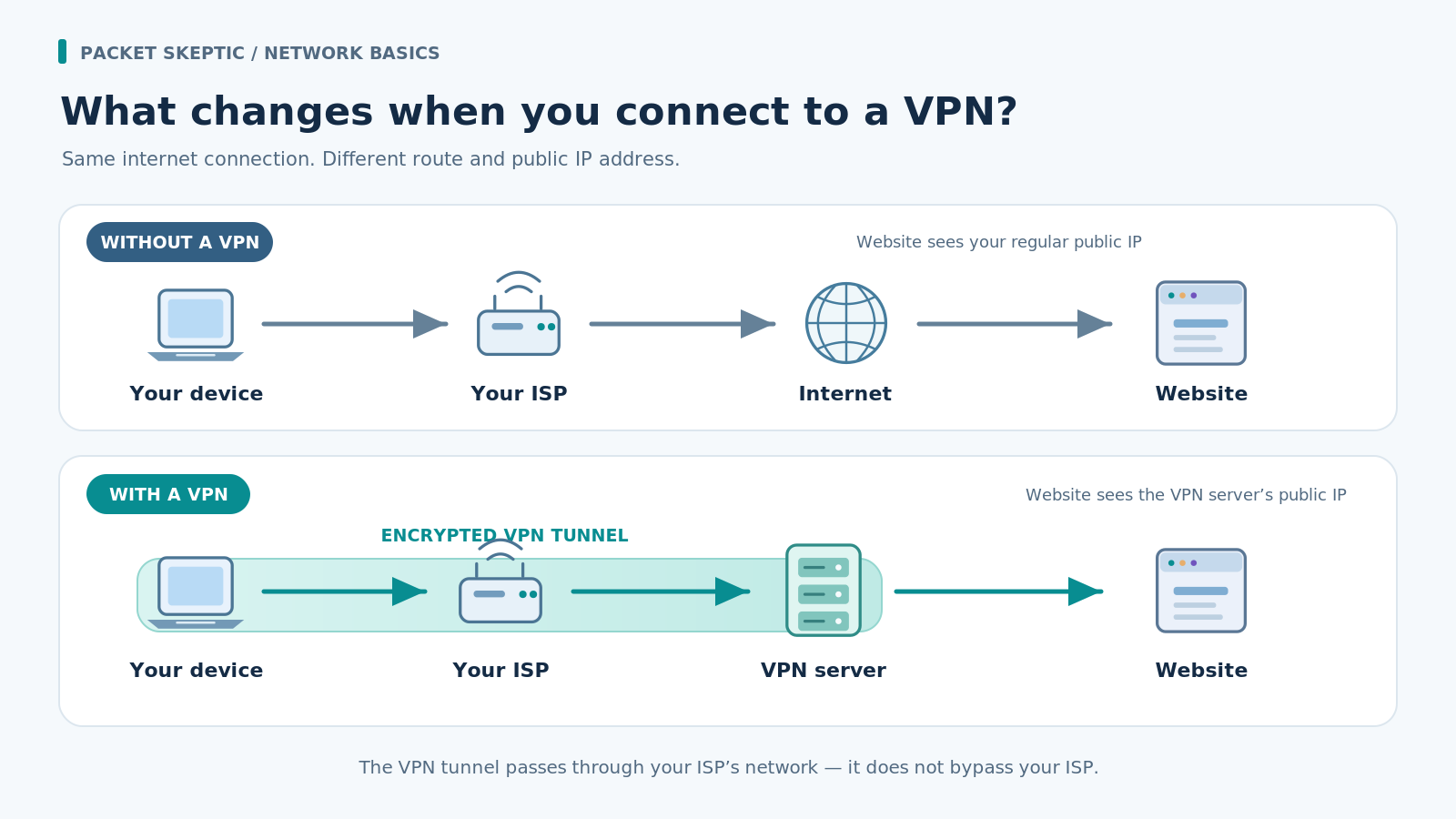
Without a VPN, packets from your computer travel through your home router, your ISP, and other networks on the way to a website.
Here's a simplified picture:
Your computer → ISP → internet → website
When you turn on a typical commercial VPN, the app establishes a protected connection to a VPN server. In a common setup, the device sends all its internet traffic through that server first.
The path now looks like this:
Your computer → ISP → VPN server → internet → website
The VPN server receives traffic from your device and forwards it to the destination. Replies come back through the VPN server to you.
As a result, the website generally sees the VPN server's public IP address rather than the public address of your home connection.
That's why choosing a French VPN server may cause a website to place you in France. Your computer is still right where it was. What changed is the path the connection takes and the public IP address visible at the other end.
Why Is It Called an Encrypted Tunnel?
When a VPN app connects to its server, it creates a protected connection between the two. This is commonly called a VPN tunnel.
The word tunnel makes it sound as if your data travels through some secret passage that bypasses the ordinary internet.
It doesn't. Your traffic still uses the existing network infrastructure. The difference is that packets sent through the VPN are wrapped for transport and protected with encryption.
Think of a sealed shipping container on its way to a warehouse. The carrier knows where to deliver it, can see its size, and knows how much is being transported. But the carrier can't open it to inspect what's inside. They might make educated guesses from the clues available — but guesses aren't the same as looking inside.
A VPN works in a somewhat similar way.
Your ISP delivers encrypted packets to the VPN server without being able to read the contents protected by the tunnel. The VPN server then removes the VPN layer and processes the packets inside.
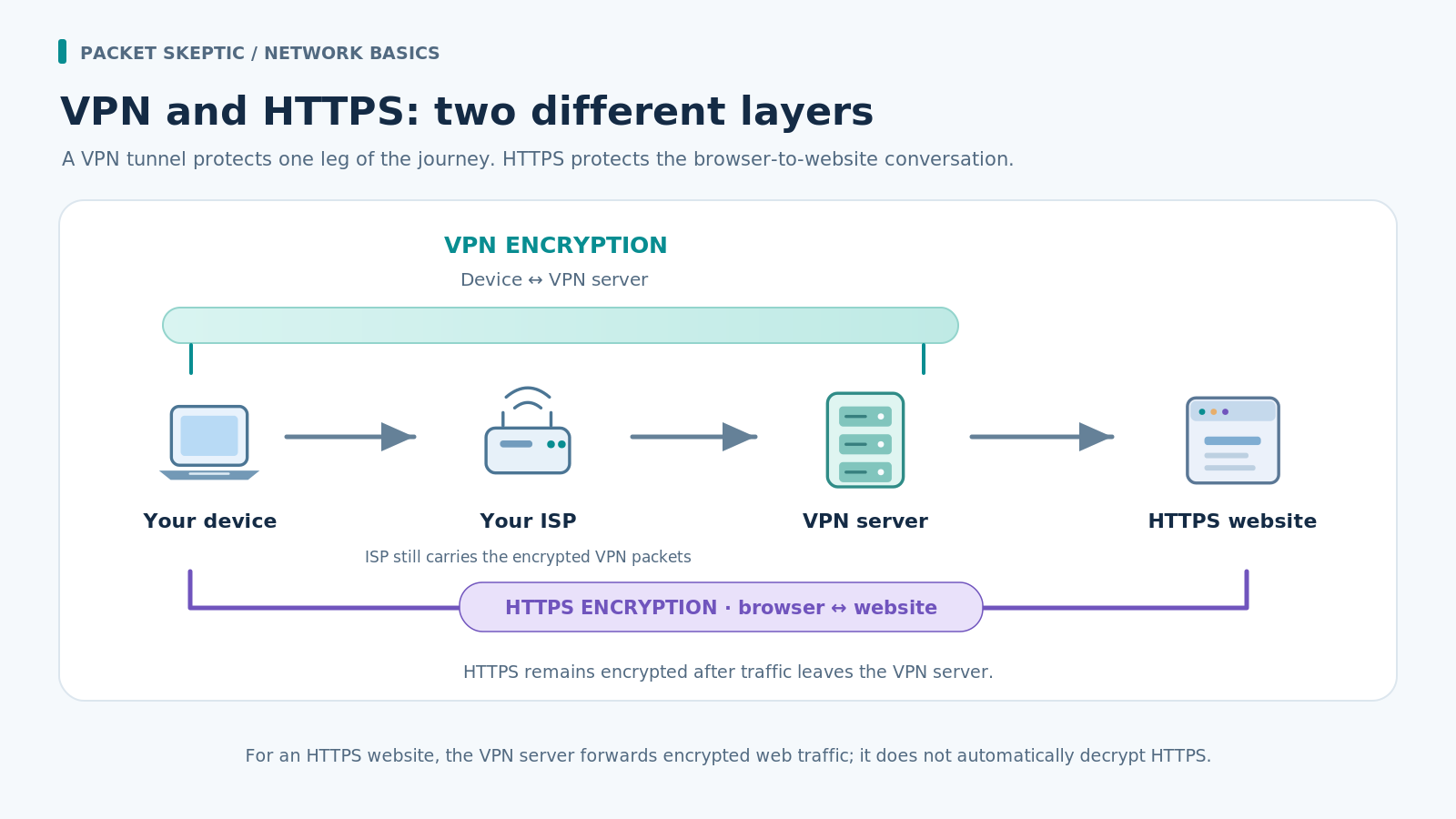
If you're visiting a site over HTTPS, that site's own encryption continues to protect the connection after the traffic leaves the VPN tunnel.
This distinction matters: VPN and HTTPS protect different parts and layers of a connection.
The VPN protects traffic between your device and the VPN server. HTTPS provides a separate encrypted connection between your browser and the website.
They aren't competing technologies. They work together.
What Can Your ISP Actually See When You Use a VPN?
Let's look at the connection from your ISP's point of view.
Your computer is connected to a VPN server. Your ISP still has to deliver packets to that server and carry the replies back. It needs enough information to do that.
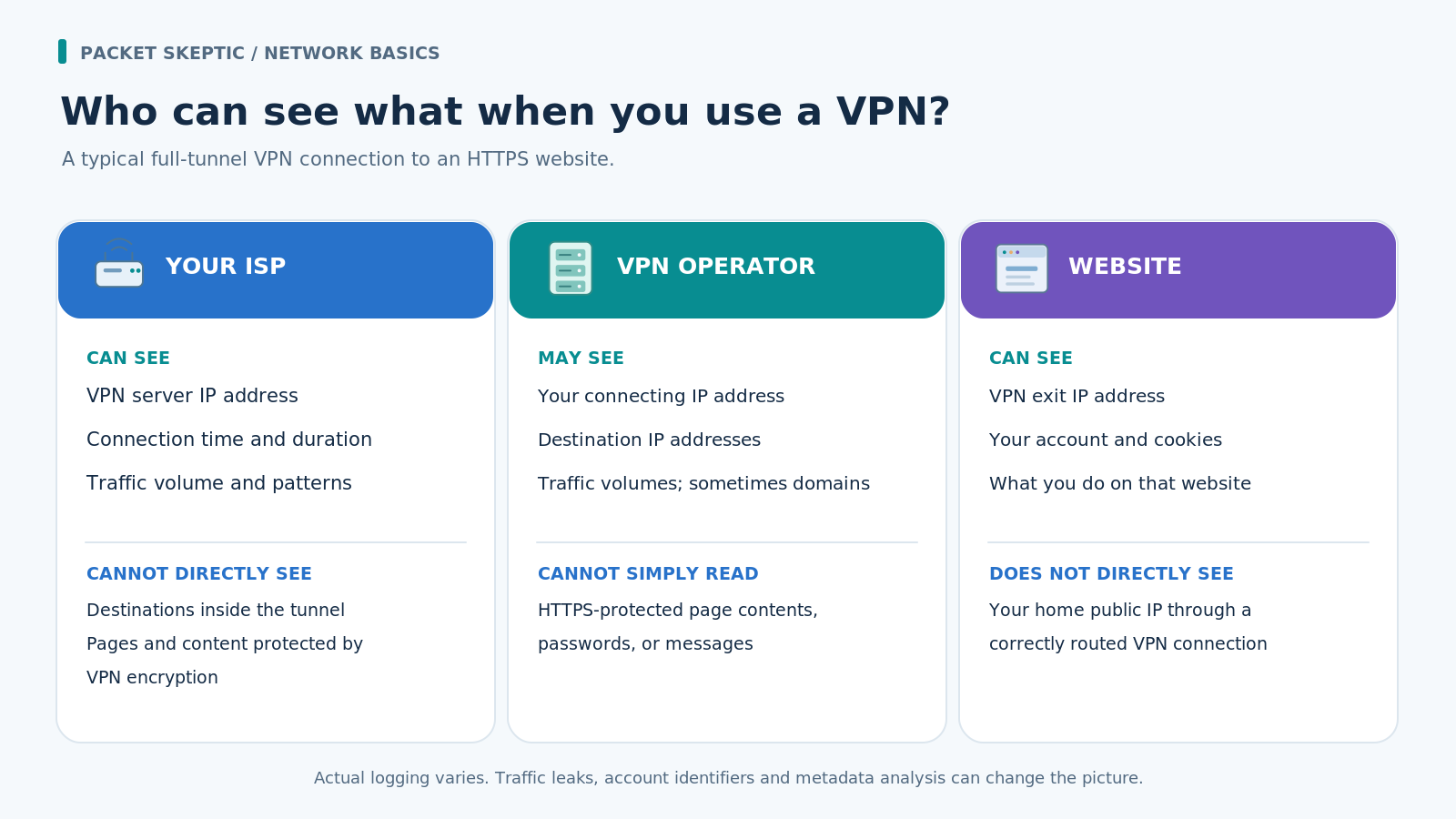
It can see the VPN server's IP address, when the connection is active, how much data goes back and forth, and how busy the connection is.
For example, your ISP might see a large amount of data passing through the VPN connection over the course of an hour.
Maybe you watched a movie. Maybe you downloaded a game. Or perhaps you uploaded a backup of your files.
Traffic patterns can sometimes provide clues, but clues are not certainty.
With a correctly configured VPN, your ISP cannot directly see inside the encrypted tunnel to find out which websites you're visiting, which pages you're reading, or what data you're sending.
As far as the traffic inside that tunnel is concerned, the VPN server is the main visible destination.
There are exceptions, though.
Some VPN apps let you route only selected applications through the tunnel. That's called split tunneling.
If your browser uses the VPN but your game connects directly, your ISP can still observe the game's connection much as it could without a VPN.
Misconfiguration can also leave some DNS requests or other traffic outside the tunnel.
So there's a difference between having a VPN connection and making sure the traffic you want protected actually uses it.
Does That Mean the VPN Provider Can See Everything Instead?
No, not everything. But it's an important question.
When you use a commercial VPN, its operator becomes another party involved in carrying your traffic.
Your ISP delivers the encrypted packets to the VPN server, which processes them and sends the traffic onward.
That means the VPN operator can potentially see some information about the connections leaving its servers: destination IP addresses, traffic volumes, and, under certain conditions, requested domain names.
However, the contents of HTTPS connections remain protected by separate encryption. Running the VPN server doesn't automatically give its operator access to your passwords, messages, or the contents of encrypted web pages.
So trust still matters.
Without a VPN, certain connection details are available to your ISP. With a VPN, some of those details are hidden from the ISP but may instead be available to the VPN operator.
A VPN doesn't eliminate the need for trust. It gives you a choice about which operator may see those connection details.
That's why choosing a VPN involves more than looking at speeds or the number of countries on offer. Who runs the service? What information does it collect? And how well do its claims stand up to scrutiny?
Can a VPN Improve Your Gaming Connection?
Let's return to the games we started with.
Many players deal with high latency, unstable connections, or occasional disconnects. Can a VPN help?
Sometimes, yes.
Data doesn't always take the shortest or most efficient route across the internet. ISPs exchange traffic with other networks, and a particular route can sometimes be congested or inefficient.
A VPN changes that route. The path through a chosen VPN server might happen to reach the game server more efficiently.
In that case, latency or connection stability may improve.
But there's another side to it.
A VPN also adds an intermediate server and some processing overhead. Sometimes a better route more than makes up for that overhead; sometimes it doesn't. You can't know which effect will win without checking the actual connection.
So the promise that “a VPN will lower your ping” isn't a universal truth.
The result depends on your ISP, the game server, the location of the VPN server, and the routes available between them.
And a VPN certainly won't repair a broken game server or an overloaded Wi-Fi network at home.
If you want to know whether a VPN helps in your particular situation, compare the results with and without it.
We'll come back to this at Packet Skeptic — with measurements.
What About Free VPNs?
Once you know what a VPN can do, a natural question follows: do you have to pay for one?
No. There are free VPN services and free tiers offered by commercial providers. Some are perfectly suitable for particular needs.
But operating a VPN costs money. Servers, network capacity, maintenance, and data transfer don't pay for themselves.
That means free offerings usually have limits or another way of covering those costs.
A service might restrict speed, data usage, or the countries you can choose from. And some lesser-known apps raise questions about what information they collect and how they use it.
Of course, a paid subscription isn't a guarantee of quality or privacy either.
An attractive website and a bold promise of “100% anonymity” tell you very little about how well a VPN actually works.
It's more useful to look at who's behind the service, how transparent it is, what technical information it provides, and whether its claims have been independently checked.
And if you need a VPN for a specific purpose — reaching a particular game, say, or accessing a service — it's worth checking whether it actually does that job before committing to a subscription.
A Quick Experiment: See the Difference Yourself
You can check one of a VPN's basic features in just a few minutes.
First, disconnect from your VPN and search for what is my IP. You'll find plenty of websites that display your public IP address.
Take a look at the address and the country the site associates with it.
Now turn on your VPN, choose a server in another country, and reload the page.
If your connection to the test site is going through the VPN server, the public IP address will usually change. The reported country will probably change too.
For example, the site might show a UK IP address before you connect and a French one afterward.
No magic involved.
The website is simply receiving your connection from a different exit point on the internet.
But this test demonstrates only that the public IP address seen by that site has changed. It does not prove that every bit of traffic from your device goes through the VPN, that there are no DNS leaks, or that you're completely anonymous.
Those questions require other checks. We'll explore them in future articles.
So, Does the Average Person Need a VPN?
Quite possibly. We've covered a few examples, but they're hardly the only ways a VPN can be useful.
If a service is unavailable through your normal connection, a VPN may provide another route to it.
If you want your traffic to appear to come from a different country, you can choose an exit server there.
If you'd rather limit how much information about your connections your ISP can see, a properly configured VPN can help with that too.
And if you prefer to keep different parts of your online life separate, a VPN lets you avoid exposing your usual home connection's public IP address to the services you visit.
Just don't expect it to perform miracles.
A VPN doesn't make you completely anonymous, though it can meaningfully improve privacy. It can't guarantee access to every blocked service, and it won't necessarily make your connection faster.
But does a useful technology have to solve every problem to be worth using?
A VPN offers some very specific capabilities: it can change the route your traffic takes, give you a different exit point onto the internet, and protect data between your device and the VPN server.
For some people, that's enough to solve a problem that's been bothering them for ages. For others, it means an extra degree of privacy. And some people may not need a VPN at all.
That's fine too.
The important thing is that we now know what happens when we press Connect — and what we can actually gain from it.
Which brings us to the next question: how do you choose a VPN that does the job you need, rather than one that simply makes the most convincing promises?
Was this article helpful?
Found a factual error?
Technical accuracy matters. Tell us what appears incorrect, and we will review it.