AdsPower Fingerprint Test: Can One Computer Look Like Four Different Devices?
We tested AdsPower with 17 CreepJS measurements across four browser profiles. Here's what worked, how fingerprints stayed stable, and why one simulated Mac raised questions.
Published
Myth or Measurement? | Packet Skeptic
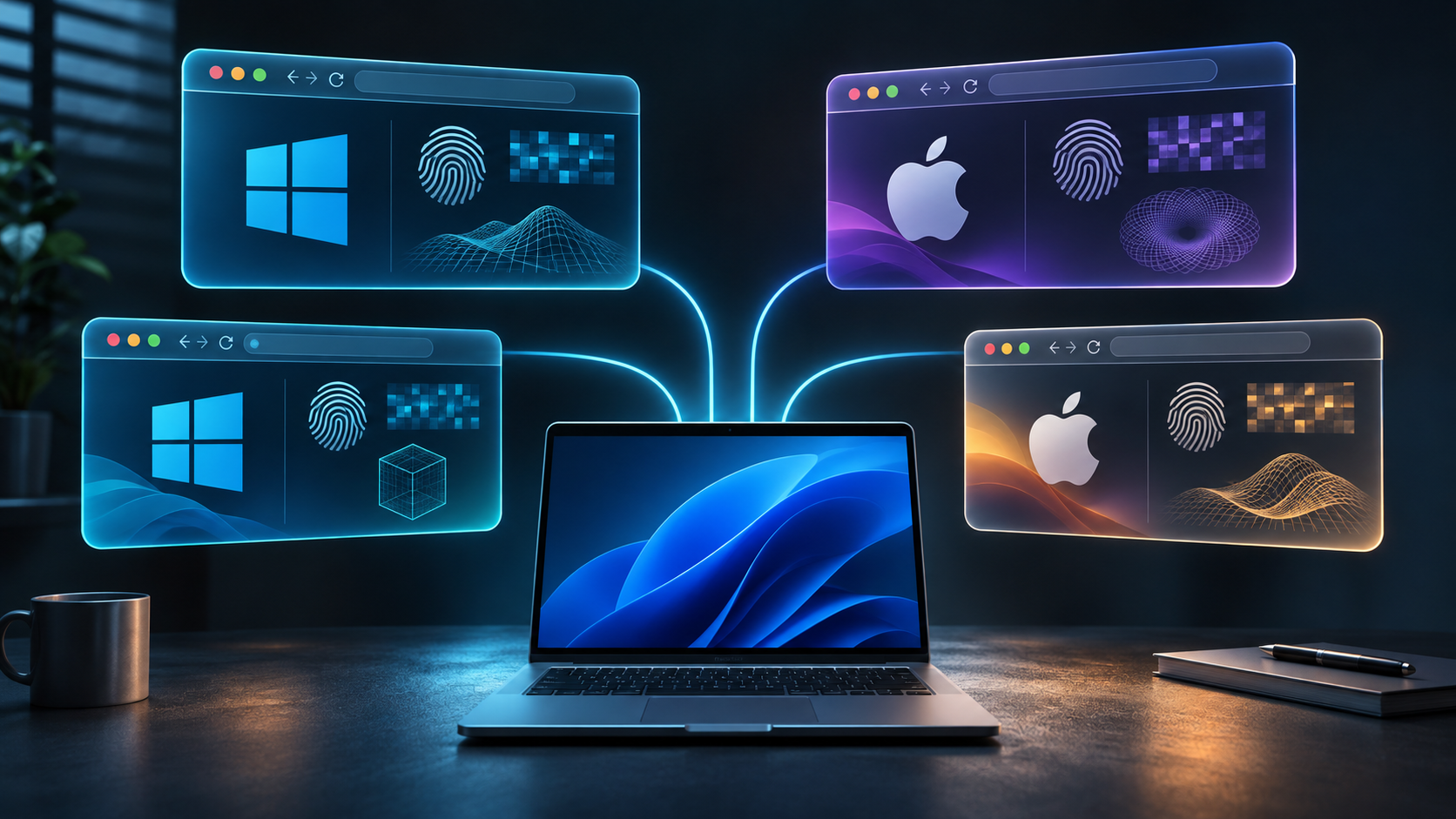
One Windows computer. Four browser profiles. One presents itself as a regular Windows PC. Another claims to be a Mac with an Apple M2 Pro chip. A third reports an entirely different hardware configuration.
But will websites actually see them as different devices?
That's exactly the kind of problem anti-detect browsers are designed to solve. We chose AdsPower, created several profiles, and ran 17 measurements using CreepJS.
Let's say this upfront: AdsPower made a good impression. It really can create distinct, stable browser fingerprints. And it offers far more settings than we needed for our experiment.
But we also found one unpleasant detail: an automatically generated Mac profile ended up with hardware specifications that didn't quite match a real Apple computer.
Let's look at what worked, what surprised us, and how much any of this actually matters.
First, We Tried Regular Chrome
Chrome lets you create separate user profiles. Each has its own cookies, logins, browsing history, and other data.
For keeping personal and work accounts separate, that's usually enough.
But there's a catch: separate browser profiles don't necessarily mean separate browser fingerprints.
A website can collect information about your graphics system, fonts, Canvas, WebGL, AudioContext, language settings, and other characteristics. Together, these can help identify a browser environment even without cookies.
We created two independent profiles in regular Chrome and tested them with CreepJS, an open-source browser fingerprinting analysis tool.
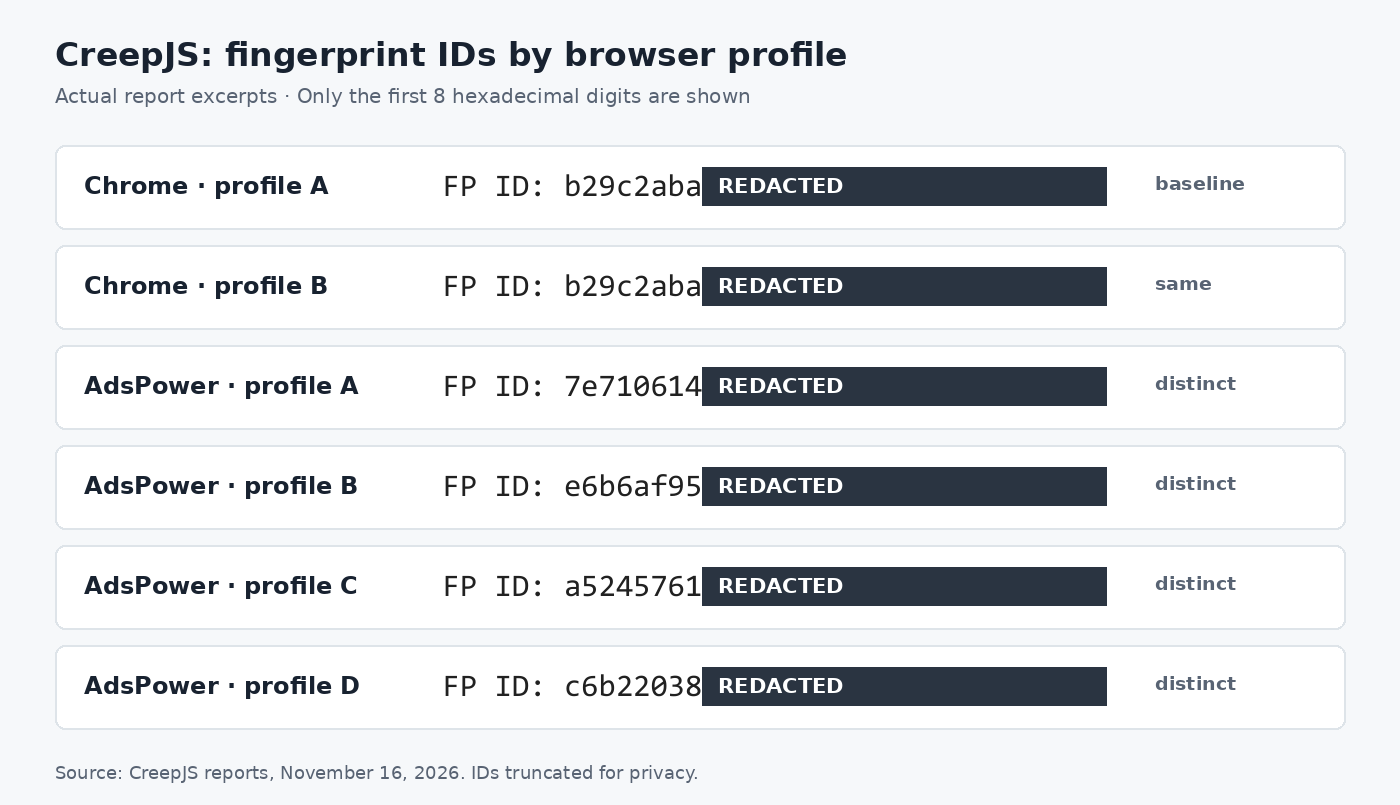
The result was predictable: both profiles produced exactly the same main FP ID. Their primary Canvas, WebGL, and Audio hashes matched too.
Refreshing the page in the first profile didn't change anything either.
That doesn't mean websites will necessarily link those profiles to the same person. But for our control test, the result was clear: Chrome separated the user data without producing a different diagnostic device fingerprint.
How We Ran the Tests
We conducted the experiment on November 16, 2026, using one physical Windows 11 computer.
Our control browser was Chrome 157. The AdsPower profiles used SunBrowser with Chromium 144 or 156, depending on the profile.
We collected 17 CreepJS reports. These included initial measurements, page refreshes, browser restarts, and tests after changing specific fingerprint settings. They were not measurements from 17 independent devices.
We used the same physical computer and internet connection throughout, without proxies.
Now let's see what AdsPower could do.
Four Profiles, Four Different Fingerprints
We installed AdsPower and created four independent SunBrowser profiles.
AdsPower allowed us to configure profiles with different operating systems and hardware specifications.
| Profile | Reported OS | Graphics hardware | Logical processors |
|---|---|---|---|
| A | Windows 10 | Intel HD Graphics | 8 |
| B | macOS | Apple M2 Pro | 20 |
| C | Windows 10 | Intel RPL-S | 12 |
| D | macOS | Intel Iris Plus | 12 |
When we opened CreepJS, all four profiles produced different main FP IDs.
Even profiles A and C were different, despite both reporting Windows 10 and running Chromium 144. So the difference couldn't be explained simply by comparing Windows with macOS.
Next, we completely closed the profiles and launched them again.
Profiles A, B, and C retained their original fingerprints.
That's a very good result for AdsPower in the context of our test. Generating a random collection of browser characteristics is one thing. Keeping a consistent identity across working sessions is something much more useful.
If you're using a profile over a long period, having all its characteristics suddenly change every time you open it would look suspicious and be more of a drawback than a benefit.
AdsPower handled this correctly in the configurations we tested.
What We Liked Most: Control Over the Settings
While creating the profiles, we discovered that AdsPower isn't simply a browser with a button labeled "Change Fingerprint."
Its settings let you control WebRTC, time zones, languages, screen resolution, Canvas, WebGL, AudioContext, fonts, hardware characteristics, and quite a few other parameters.
There are also separate settings for proxies, browser environments, and random fingerprint generation.
We didn't test every AdsPower feature. But having all these controls available through a single interface looks genuinely convenient for people who need to manage distinct browser environments.
We were particularly impressed by Canvas Noise.
Adding Noise to Canvas
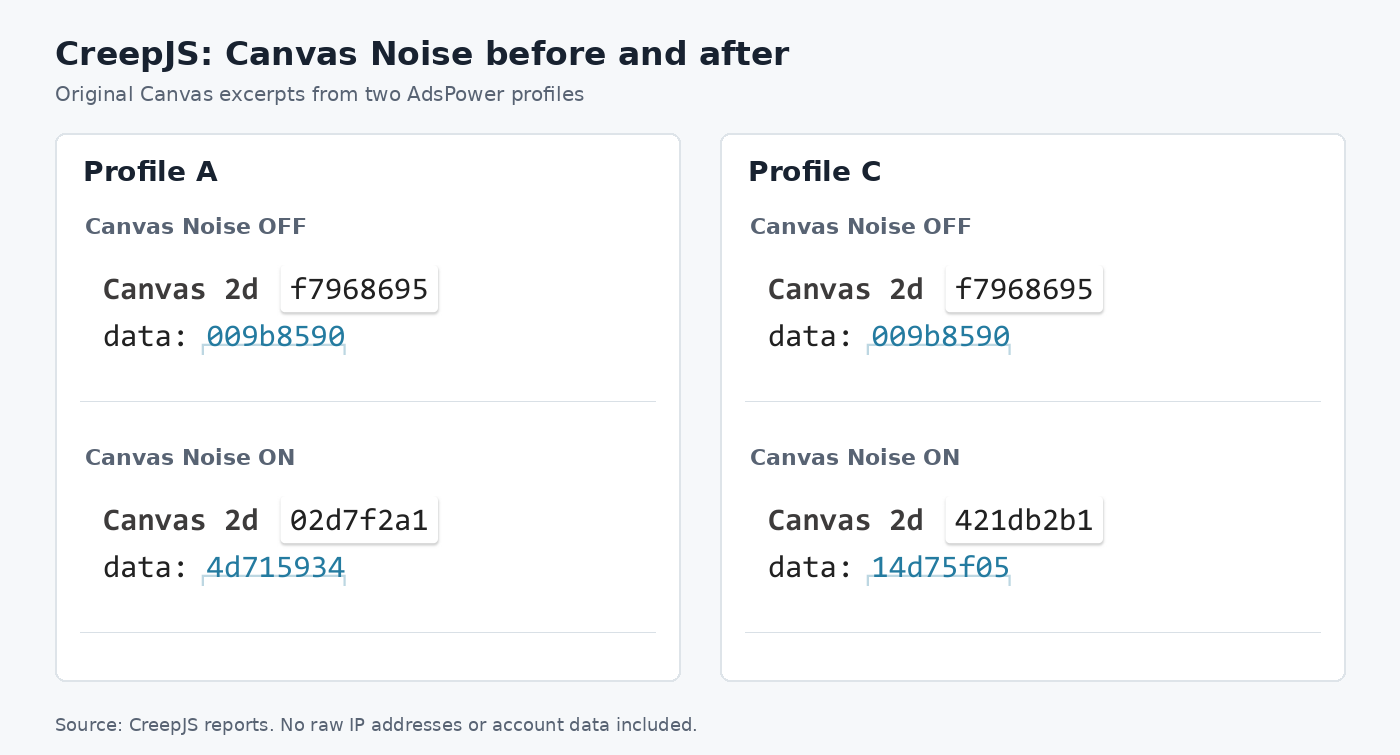
During our initial measurements, we noticed something interesting: all our profiles without Canvas Noise returned the same Canvas fingerprint, including the simulated Macs.
But AdsPower lets you deliberately modify that data.
We enabled Canvas Noise in two Windows profiles and repeated the measurements.
| Profile A | Profile C | |
|---|---|---|
| Canvas without noise | f7968695 | f7968695 |
| Canvas with noise | 02d7f2a1 | 421db2b1 |
| After restarting | Unchanged | Unchanged |
We got exactly what we wanted to see: the two profiles started returning different Canvas hashes. And each profile retained its new value after being completely closed and reopened.
Some WebGL results and the overall FP IDs changed as well. Audio and Fonts remained unchanged during this part of the experiment.
This is where AdsPower performed particularly well: it didn't just alter the graphics fingerprint. It maintained distinct, consistent results for both profiles.
Of course, this doesn't guarantee that a sophisticated anti-fraud system couldn't detect the Canvas modification itself. We didn't test that.
But the advertised ability to control the graphics fingerprint definitely worked in our experiment.
What If You Want a New Fingerprint Every Time You Launch the Browser?
AdsPower also offers a feature called Random Fingerprint.
The interesting part is that it can change some profile characteristics when the browser starts, rather than generating them only once when the profile is created.
We tested it using profile D, which presented itself as a Mac with Intel Iris Plus graphics.
After completely closing and reopening the browser, we got a new main FP ID. Canvas and WebGL image hashes changed, while the graphics model, logical processor count, Audio fingerprint, and several other characteristics stayed the same.
Then we pressed F5.
And here's the part we liked: the new fingerprint remained unchanged throughout the session we tested.
In other words, during our single restart cycle, AdsPower changed selected characteristics when the browser launched, then kept them stable when we refreshed the page.
That's a sensible approach for this kind of feature. If the browser generated a new Canvas result every time a website queried it, maintaining a consistent fingerprint within a single session could become a problem.
Of course, constantly changing fingerprints isn't always a good idea. For long-term use with the same account, a stable environment often makes more sense.
It's good that AdsPower provides different options instead of forcing everyone into the same approach.
But One Virtual Mac Surprised Us
Up to this point, AdsPower had worked without any significant issues.
Now let's take another look at profile B.
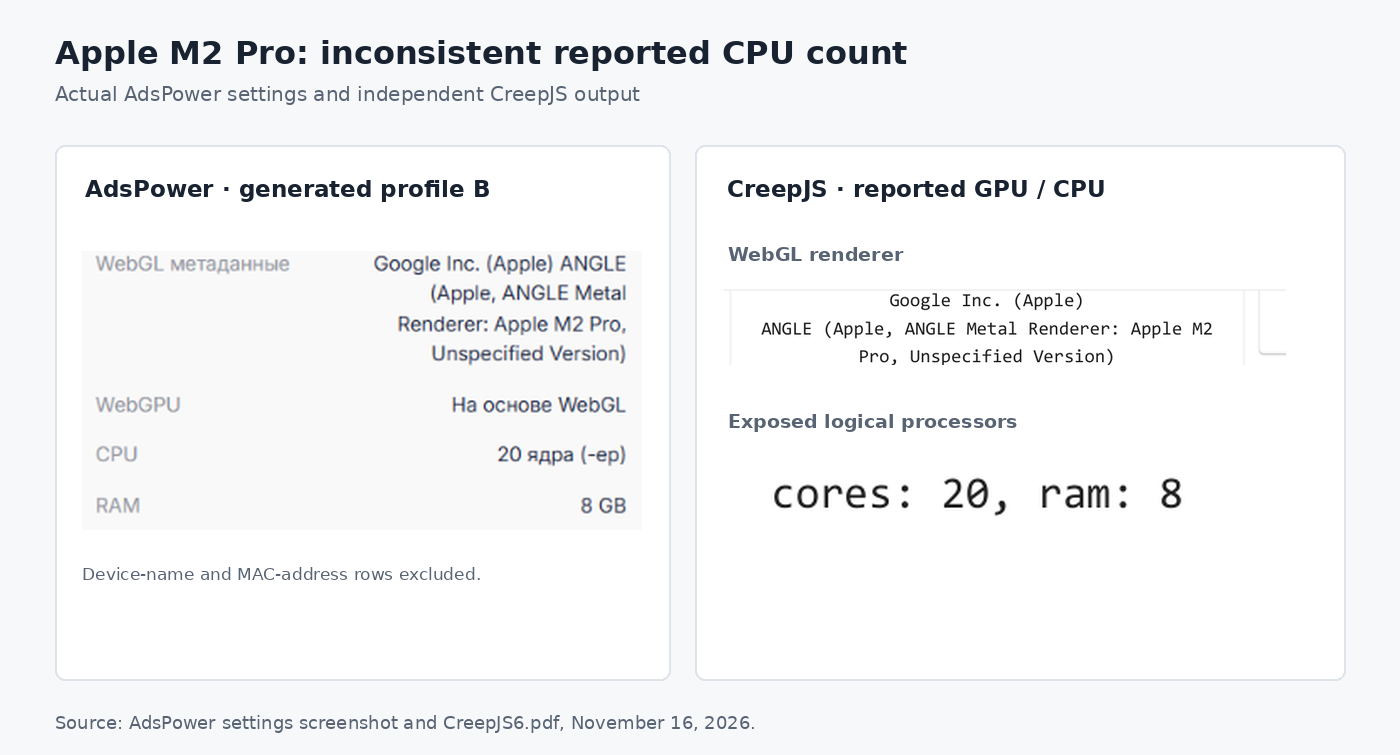
We selected macOS and let the program generate the hardware characteristics automatically.
AdsPower created a profile with Apple M2 Pro graphics and a setting of CPU: 20.
CreepJS reported the same 20 logical processors.
And here's the problem.
The real Apple M2 Pro comes with either a 10-core or a 12-core CPU.
The browser's hardwareConcurrency value doesn't necessarily equal the number of physical CPU cores, and software can modify it. But an M2 Pro reporting 20 available logical processors is an implausible combination.
Could an automated system detect that inconsistency? Yes, if it compared the reported browser characteristics against known hardware specifications.
Does that mean Google, Meta, or another platform would automatically recognize our profile as artificial? We don't know. We didn't test their detection systems in this experiment.
But the result reveals a genuine limitation of automatic fingerprint generation: different characteristics aren't necessarily consistent characteristics.
That's why we'd recommend checking the hardware parameters AdsPower generates automatically, especially when a profile claims to represent a specific device model.
At the same time, one problematic profile doesn't mean the entire generator is bad. We found one concrete example, not a statistical pattern across thousands of generated devices.
And AdsPower allows users to adjust a number of these parameters manually. So this is both a weakness in the automatic generation process and a reminder to check your own configuration.
A Separate Question: IP Addresses
All four profiles used the same internet connection.
In two AdsPower profiles, CreepJS could see the same public IP address through WebRTC/STUN as it did in regular Chrome.
In the other profiles, WebRTC was disabled. In one case, that happened because we accidentally selected the setting ourselves.
Another reminder that it's worth paying attention to the configuration.
A separate browser fingerprint doesn't mean a separate network connection. A website may receive different browser characteristics while still seeing the same public IP address for ordinary requests.
AdsPower provides proxy configuration options for individual profiles. That's useful if you need to separate not just browser environments but network connections as well.
However, we didn't use proxies in this experiment, so we're not going to evaluate how well that feature works.
Who Actually Benefits from AdsPower?
After spending several hours with the program, we had a better understanding of why tools like this exist.
If you simply need to keep your personal and work accounts in different browser profiles, Chrome already handles that.
But AdsPower gives you more control.
For example, someone managing multiple separate client environments might find it convenient to keep them in independent profiles, assign individual settings, control browser characteristics, and use separate proxies when necessary.
It can also be useful for web application testing, where switching between different simulated configurations is convenient. Although simulating a device is no substitute for testing on real hardware.
And in these scenarios, AdsPower looks quite convincing.
We didn't examine every feature, test team collaboration, or measure performance with dozens of profiles running simultaneously. That would have turned one small experiment into an enormous article. We'll probably return to the subject later and explore it further.
But the features we did test worked:
- Creating distinct browser fingerprints.
- Preserving characteristics after restarting a profile.
- Controlling Canvas Noise.
- Generating a changed fingerprint on the next launch.
- Configuring WebRTC behavior.
If your work requires these capabilities, AdsPower is definitely worth a look.
And you don't have to pay just to see whether it suits your needs.
AdsPower offers a permanently free plan with two browser profiles. That's enough to repeat our basic fingerprint comparison yourself.
Create two profiles, open CreepJS in each, compare their results, and see what changes. It's a much better way to evaluate the tool than simply taking anyone's word for it.
You can run the comparison using the original CreepJS.
Affiliate disclosure: The AdsPower link is an affiliate link. If you purchase a paid subscription through it, Packet Skeptic will receive a commission. This does not influence our measurements or conclusions. And when something doesn't work as it should, we say so openly.
Myth or Measurement? Our Verdict
The claim: AdsPower lets you use one computer as several separate browser devices.
Verdict: Confirmed at the level of the browser fingerprints we measured.
Our measurements showed that AdsPower successfully creates distinct, stable diagnostic fingerprints. Canvas Noise and random fingerprint generation also behaved as expected in our tests.
The program's main strength isn't any particular unique hash. It's the ability to control the characteristics of individual browser profiles with considerable flexibility.
That said, automatic fingerprint generation isn't perfect. One of our simulated Macs ended up with an implausible combination of an Apple M2 Pro and 20 logical processors.
We also didn't test whether real-world platforms could link these profiles together.
Overall, AdsPower left us with a positive impression. It handled the main tasks in our experiment and provided considerably more functionality than simply switching between regular Chrome profiles.
But changing your digital fingerprint shouldn't be confused with a guarantee that you can't be tracked. Nobody can guarantee complete untrackability.
A good tool gives you control. How wisely you use that control is another question entirely.
Was this article helpful?
Found a factual error?
Technical accuracy matters. Tell us what appears incorrect, and we will review it.